

Time to read :
1 min read
Planning to build a Learning Management System? One of the first things you need to understand is the cost. The price of developing an LMS can vary depending on features, integrations, user volume, and overall platform complexity.
The truth is, the LMS development cost depends entirely on what you actually need your platform to do. The global eLearning market is expected to reach $800 billion by the end of 2030.
So, if you only need a basic portal for simple internal training, the price is manageable. However, your investment increases if you are building a custom engine to scale a massive education business.
The average LMS development cost ranges from $30,000 to $200,000 or more, depending on feature complexity, integrations, and scalability requirements. By the time you finish this guide, you will know exactly what to look for and how to avoid paying for features you do not need.
Key Takeaways
Choose custom builds for long-term scalability and ownership
Budget for hidden costs like maintenance and data migration
Select specialized partners to avoid technical debt
Define clear use cases to maximize your ROI
Adopt MVP strategies to launch efficiently and reduce initial risk for your training platform
Global LMS Development Cost Breakdown
When you evaluate where to build your platform, geography acts as a primary lever for your budget. However, selecting a region solely based on the lowest hourly rate can be a trap. The most successful projects balance LMS development cost with factors such as communication alignment, technical expertise, and the team's specific domain experience.
Cost by Hourly Rate Regional Comparison
The following table reflects current market averages for 2026. These figures represent the blended hourly rates for professional development teams.
Region | Typical Hourly Rate | Primary Advantage |
North America | $100 to $300 | Local collaboration and cultural alignment |
Western Europe | $80 to $200 | Strong enterprise and compliance expertise |
Latin America | $50 to $100 | Excellent time zone overlap with the US |
Eastern Europe | $20 to $99 | High technical proficiency and value |
Asia | $25 to $200 | Massive talent pool and scalability |
Cost by Project Size
Project Size | Focus Area | Estimated Budget |
Pilot or MVP | Core functions only | $15,000 to $30,000 |
Mid-Range Growth | Branded experience and basic automation | $40,000 to $80,000 |
Enterprise Ecosystem | Advanced AI, deep integrations, and global scale | $100,000 to $300,000+ |
Cost by User Volume
Volume Tier | User Count | Key Requirements | Financial Impact |
Low Volume | Under 500 | Standard Cloud Servers | Minimal |
Medium Volume | 500 to 5000 | Robust Cloud Infrastructure | Moderate |
High Volume | 5000 plus | Automated Horizontal Scaling | Substantial |
Cost by Feature Complexity Tier
Complexity Tier | Feature Examples | Impact on Development |
Standard | Course player, quizzes, user profiles | Minimal engineering effort |
Advanced | AI recommendations, gamification, custom APIs | High engineering hours |
Complex | VR integration, real-time video, custom compliance engines | Significant research and QA |
The Financial Reality of LMS Development Cost
LMS Development Cost Formula –
LMS Cost = (Development Hours × Hourly Rate)
Many websites offer automated calculators to estimate the enterprise LMS pricing. In our experience, these tools are often misleading because they rely on generic assumptions. They might ask for your user count but ignore critical details, such as custom security requirements or complex API connections.
When you evaluate the total investment, you have to separate simple tools from custom software. A website plugin is cheap at the start, but it often limits your growth potential. A custom system is an asset owned by your company, not a monthly rental. If you are starting your research, understand that your final number will be driven by the scope of what you build, not by a generic quote from a calculator.
Factors That Determine Your LMS Development Cost
If you are trying to understand how much an LMS costs, you should look at these four core pillars that drive the development effort.
Feature Complexity
The gap between a simple content library and an advanced education platform is massive. If your goal is to upload PDFs and track completion rates, the development timeline stays short, and the cost remains low.
However, many businesses require more power. You might need:
Gamification tools, such as leaderboards and digital badges, to motivate learners
Advanced analytics to track student progress and performance trends
AI-driven recommendation engines that suggest courses based on past behavior
Live virtual classroom support or integrated webinar capabilities
Every new feature adds layers of logic, testing, and potential edge cases that our team must address. The more features you add to your wish list, the more hours of development time you will require.
Integration Requirements
Rarely does an LMS exist in a vacuum. To be truly effective, your platform must talk to your other business tools. Integrating your system with your existing software technology stack is a significant portion of the budget.
Think about the connections you might need:
Linking to your CRM to sync student records and sales data
Connecting to your HR system to automate employee onboarding
Setting up secure payment gateways if you plan to sell your courses
Syncing with communication platforms like Slack or Microsoft Teams for notifications
Scalability and Infrastructure
Will you launch with 50 users, or do you expect 5,000 learners in your first year? The answer changes everything about how developers architect your software.
That involves setting up robust cloud infrastructure to ensure your platform remains fast and responsive even during peak hours. An enterprise platform that supports thousands of concurrent users requires a fundamentally different database design approach than a smaller system. Choosing the right infrastructure early helps you avoid a costly rebuild later as your company grows.
Design & User Experience
A difficult-to-navigate LMS will hurt your results. If students cannot find their lessons, they will not finish them. Investing in a clean interface and smooth user flow is not just about looks. It is about retention. Our design team focuses on intuitive navigation, mobile responsiveness, and accessibility standards to ensure that every user has a great experience.
A seasoned LMS software development company will help you prioritize the essentials so you can launch a successful platform while keeping your initial investment under control.
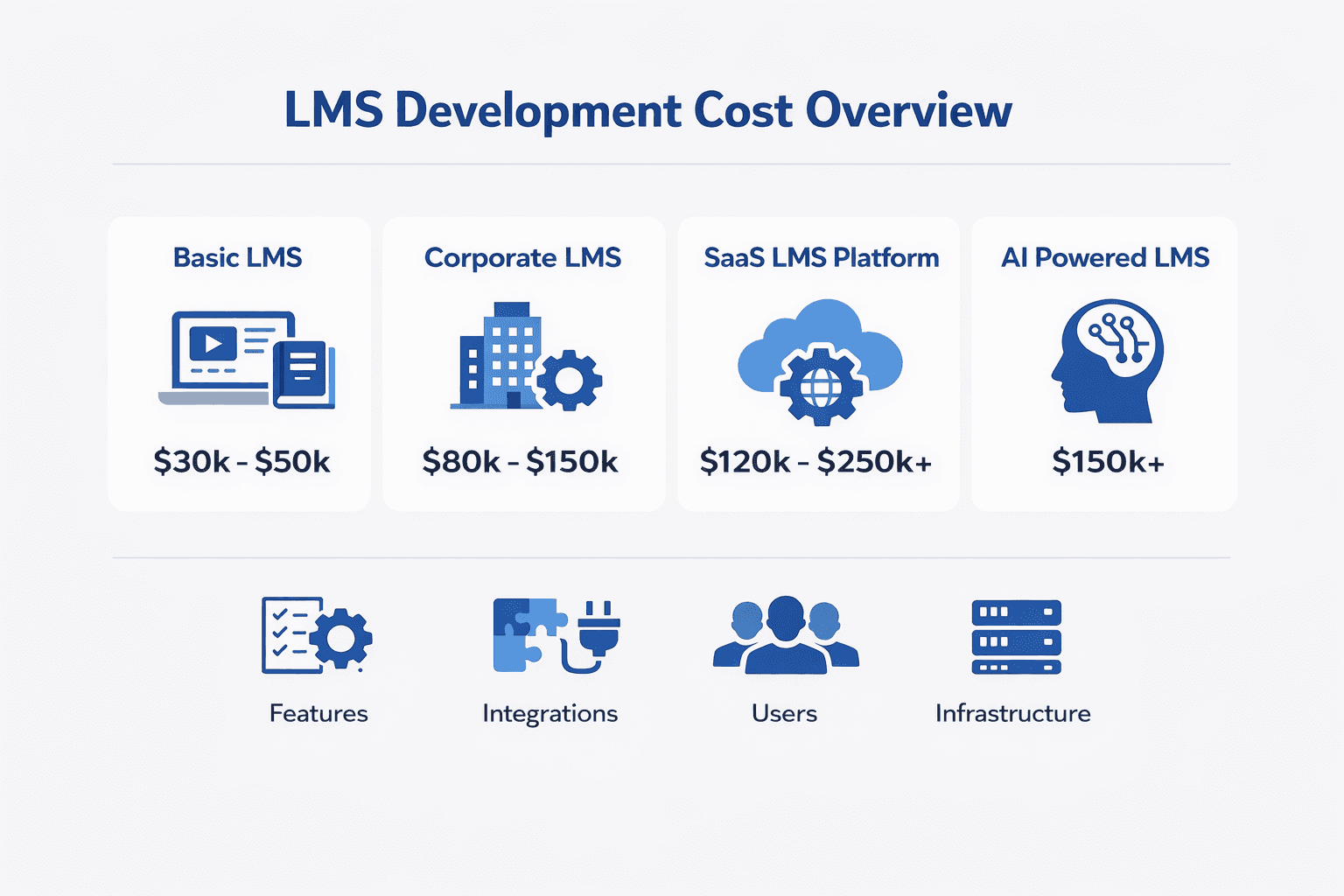
Cost by LMS Type
LMS Type | Estimated Cost |
Basic Internal Training LMS | $30,000–$50,000 |
Corporate Enterprise LMS | $80,000–$150,000 |
SaaS LMS Platform | $120,000–$250,000 |
AI-Driven LMS | $150,000+ |
Detailed Breakdown of the Development Process
When you hire a specialized LMS software development company, you are not just paying for code. You are paying for a predictable process. A clear path from concept to launch is what prevents budget overruns and ensures the final product actually works for your business.
Phase 1: Discovery and Strategy
That's your foundation. Many clients want to skip this to save money, but in our experience, this is the most dangerous mistake you can make.
Activity | Goal | Business Benefit |
Requirements Gathering | Define specific goals. | Avoids scope creep and wasted spend. |
Workflow Mapping | Visualize user paths. | Keeps the product focused on results. |
Technical Planning | Choose the right stack. | Ensures the system can scale. |
Phase 2: UI & UX Design
Design is not just about making the platform look attractive. It is about psychology and conversion. If a user cannot find their course or finish their quiz, your training is worthless.
Activity | Goal | Business Benefit |
Wireframing | Map the page structure. | Validates flow before we write code. |
Prototyping | Create a clickable demo. | Allows you to test the app's features. |
Visual Design | Apply branding and style. | Builds trust and professional appeal. |
Phase 3: Core Development
Developers take the designs and the technical plan to build the actual software. We use an agile approach. You get to see progress in stages rather than waiting until the very end to see the final product.
Activity | Goal | Business Benefit |
Front-end Build | Create what users see. | Ensures accessibility and speed. |
Back-end Development | Build the logic and database. | Ensures security and data integrity. |
Connect to other tools. | Make the system part of your ecosystem. |
Phase 4: Quality Assurance and Testing
Never launch without this. It must be secure, stable, and bug-free. Professionals here perform rigorous tests to simulate real-world conditions. This ensures that if 100 users log in at the same time, the system stays online and fast.
Activity | Goal | Business Benefit |
Unit Testing | Check individual code pieces. | Catches logic errors early. |
Security Audit | Find and close vulnerabilities. | Protects your user data and privacy. |
Load Testing | Simulate peak user volume. | Ensures the system does not crash. |
The following table provides a breakdown based on a $100,000 development budget. While your specific total will change, this distribution is a reliable standard for professional agencies-
Phase-Wise Table for LMS Development Cost
Development Phase | Budget Percentage | Estimated Cost |
Discovery and Strategy | 10% | $10,000 |
UI and UX Design | 20% | $20,000 |
Core Development | 50% | $50,000 |
QA and Testing | 20% | $20,000 |
Custom LMS vs Ready Made Solutions
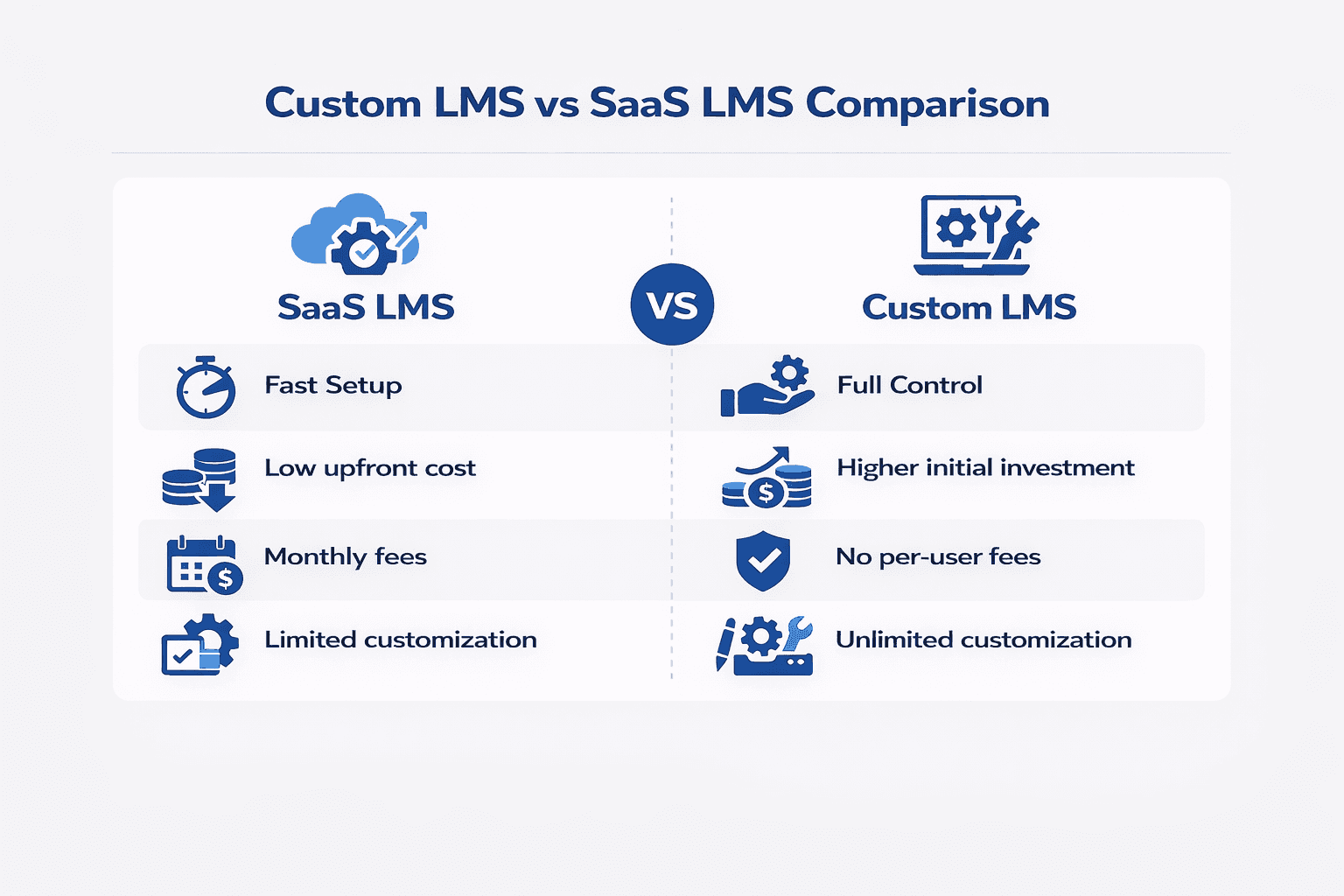
Most business leaders reach a crossroads early in their project: do you pay a monthly fee for a prebuilt tool, or do you invest in your own software? There is no correct answer, only the answer that fits your current business stage.
The Ready-Made Path
Ready-made tools, often called SaaS (Software as a Service), are appealing because they offer speed. You can sign up, pay a fee, and start uploading content within minutes. That is a smart choice for teams that need to launch training immediately and have simple requirements.
However, the LMS implementation cost model is different. While the setup cost is low, you pay a recurring subscription fee that grows as your user base expands. Over the long term, these monthly costs can exceed the price of building your own platform. You also trade away control; you are limited to the features the vendor chooses to build, and your data lives on their servers, not yours.
The Custom Build Path
A custom LMS is an asset. You own the code, the data, and the roadmap. While the upfront investment is higher, you eliminate per-user licensing fees. This allows you to scale your training program without your costs spiralling out of control as your company adds more learners.
A custom build is right for you if you have unique workflows, strict security needs, or need your LMS to integrate with your existing business software. It gives you complete control over the design, ensuring the platform looks and feels like a natural part of your brand.
Use this table to weigh which option aligns with your current priorities-
Feature | Ready Made Solution | Custom Build |
Initial Setup Time | Immediate | Weeks to Months |
Upfront Cost | Very Low | Higher |
Licensing Fees | Monthly Per User | None |
Customization | Limited to Templates | Unlimited |
Data Ownership | Vendor Owned | You Own Everything |
Scalability | Limited by Vendor | Scalable to Your Needs |
When to Choose Which
Choose Ready Made if: You are a small team, you have basic training needs, you need to launch today, and you do not want to manage technical infrastructure.
Choose Custom if: You have unique workflows, you need deep integration with other tools, you want to avoid recurring fees, or you want to own your data and intellectual property.
The mistake many companies make is staying on a ready-made platform for too long. They outgrow the features and pay expensive premiums for extra users, effectively renting a house they should have bought years ago. If you find yourself frustrated by what your current tool cannot do, that is a clear signal that you are ready to build a custom solution.
Hidden Expenses You Cannot Ignore
Many businesses focus entirely on the initial development quote. While that number is important, it does not represent the full LMS development cost of ownership. You should plan for these expenses now so you do not face a budget crisis later.
Use this table to understand the recurring financial obligations that follow the initial build-
Expense Category | Description | Estimated Impact |
Data Migration | Moving existing records and files into your new system. | Often higher than expected due to cleanup work. |
Server and Hosting | Fees for cloud storage and computing power. | Scales upward as your user base grows. |
Ongoing Maintenance | Updates for security and performance tweaks. | Required to keep the system stable and safe. |
Compliance Audits | Keeping up with changing data laws. | Necessary for avoiding legal and safety risks. |
Third Party Licenses | Fees for external APIs like Zoom or Stripe. | Can add up if not tracked properly. |
Treating these expenses as separate from the development budget is a mistake. When you speak with an LMS software development company, ask them to include a roadmap for these LMS development costs.
Outlining the Top LMS Use Cases
Building a system for internal employee training is a different challenge from building one to sell courses to external customers. Here are the top LMS use cases-
Corporate Training and Employee Onboarding
It's the most common reason businesses build a custom platform. When your team grows, keeping every employee aligned on company culture and operational standards is a massive challenge. A custom training system ensures that your onboarding process is consistent, scalable, and tracked correctly.
Goal | Key Feature | Business Metric |
Faster Onboarding | Automated course enrollment | Time to productivity per new hire |
Knowledge Retention | Gamified quiz sections | Improvement in assessment scores |
Consistent Culture | Centralized video library | Employee engagement rates |
Customer Education and Product Adoption
Companies should build an LMS to train their customers on how to use their products. This is a brilliant strategy for reducing support costs and increasing retention. When customers know how to use your software or product, they get more value from it and are much less likely to cancel their subscriptions.
Goal | Key Feature | Business Metric |
Reduce Support Load | Searchable help documentation | Decrease in customer support tickets |
Increase Adoption | Interactive product tutorials | Time to first customer success milestone |
Brand Authority | Fully branded course portal | Customer retention and lifetime value |
Compliance and Regulated Industry Training
In sectors like finance, healthcare, or heavy manufacturing, training is not optional. It is a legal requirement. In these environments, if you cannot prove that a user completed a specific course, it is as if that training never occurred.
Goal | Key Feature | Business Metric |
Audit Readiness | Immutable training logs | Pass rate for industry compliance audits |
Certification | Automatic certificate generation | Percent of staff compliant on deadline |
Data Security | Advanced encryption and access control | Reduction in legal and safety risks |
Tips to Optimize LMS Cost
You want a powerful platform, but your budget is not infinite. The good news is that optimizing your learning management system cost does not mean you have to sacrifice quality or performance. It just means you need to be strategic about how you build.
Build an MVP (Minimum Viable Product)
The biggest mistake is trying to build everything at once. Companies often spend months and tens of thousands of dollars on features that users never actually touch. The smartest way to launch is to build a Minimum Viable Product.
An MVP focuses strictly on the core problem your users need to solve. If your goal is employee onboarding, build the content delivery and tracking features first. Save the gamification, complex reports, and social forums for version two.
Prioritize Features Using a MoSCoW Method
Use this framework to manage your budget and keep the project focused on business goals.
Feature Priority | Description | Examples |
Must Have | Essential for the system to work | User login, course upload, progress tracking |
Should Have | Important but not vital for launch | Basic search, simple quizzes |
Could Have | Nice to have if time and money allow | Leaderboards, badges, custom certificates |
Won't Have | Features to drop for this version | AI recommendations, complex social media integration |
Use Open Source Frameworks
You do not need to reinvent the wheel. Many reliable open-source frameworks exist that allow developers to build the foundation of their software much faster. Open-source frameworks are often maintained by large developer communities that constantly test and patch the code.
Avoid the Trap of Scope Creep
Scope creep is the silent killer of development budgets. It happens when new ideas appear mid-project and are added to the pile without anyone considering the time or cost impact.
Summary of Cost Optimization Techniques
Technique | How It Saves You Money | Best For |
MVP Approach | Prevents building unused features | Startups and rapid launches |
Feature Prioritization | Keeps development focused | Keeping the budget under control |
Open Source | Reduces core coding time | Speed to market and security |
Strict Scope Control | Eliminates unnecessary hours | Staying on schedule |
A successful LMS is not the one with the most features; it is the one that solves the right problem for your users at the right time.
Future Trends of LMS Systems
The world of digital training is moving fast. If you build a platform today, you must build for where the industry is going tomorrow. Here are the trends-
AI-Based Personalization
The era of static courses is ending. Learners now expect an experience that adapts to their needs. Instead of forcing every student through the same linear path, your system can identify where a learner struggles and offer extra support.
Mobile First Design Standards
Learners consume content everywhere. They study on the commute, during breaks, and from home. If your platform does not work flawlessly on a phone screen, you lose your audience.
Seamless Interoperability
To provide true value, your LMS must communicate with other business tools. The future is about open standards that enable your platform to share data with your HR software, CRM, and project management tools. This connectivity creates a unified view of your business.
Focus on Microlearning
Attention spans are shrinking. Learners are much more likely to complete a three-minute video than a 60-minute lecture. There's a strong trend toward bite size lessons that deliver specific skills quickly. This approach forces you to cut the fluff and focus on the core value.
Data Driven Decision Making
The goal is no longer just tracking completion rates. It is about understanding the impact of training on your bottom line. Modern systems provide deep insights into how training affects employee productivity and customer success.
Why Choose Deliverables for LMS Software Development?
A specialized LMS software development company brings experience with the specific challenges of education platforms, including data security, user engagement, and complex integration requirements.
We believe in transparency. You will never be left wondering about the status of your project, the state of your budget, or why we made specific technical choices. We work with you at every stage of the process.
Strategic Discovery: We start by listening. Before we write a single line of code, we map out your business goals to ensure the architecture supports your future growth. This phase prevents costly changes later.
Custom Development: We build software that you own. Our code is clean, documented well, and built to scale. You get a system that fits your brand and your specific operational needs.
Ongoing Support: A launch is just the beginning. We provide the maintenance and technical support needed to keep your system secure, stable, and performing at its best over the long term.
Start Your Custom LMS Project with Us Today
Planning to build a platform that actually scales? You do not have to do this alone. Our team at Deliverables Agency helps businesses turn training goals into reliable software assets. Schedule your discovery call now to get a transparent and honest project estimate.
Some Topic Insights:
How long does the development process actually take?
Most custom LMS projects take between 3 and 6 months. The timeline depends on the complexity of your features and the number of integrations. A simple portal can launch faster, while an enterprise system with multiple third-party connections requires more time for rigorous testing.
What is the highest hidden cost in LMS development?
Can I start small and add features later?
Should I build a custom system or buy an off-the-shelf product?
How do I know if I need a custom LMS?