


Time to read :
1 min read
Your online store runs your business. But what happens when your platform can't keep up? Growth stalls. Page speeds drop. Customer complaints pile up.
Switching ecommerce platforms sounds terrifying. One wrong move could wipe out years of customer data, tank your search rankings, or cost thousands in lost sales.
Yet businesses migrate successfully every day. The difference? They understand what ecommerce migration services actually involve and prepare accordingly.
This guide walks through everything about moving your online store in 2026. Real costs. Actual timelines. Migration strategies that protect your data and revenue.
Key Takeaways
Ecommerce platform migration takes 4-12 weeks on average, depending on store size and complexity
Data migration costs range from $1,000 to $50,000+ based on catalog size and customization needs
Zero downtime migration is possible with proper planning and staging environments
Product data, customer information, and order history are the three critical migration elements
SEO preservation requires 301 redirects and careful URL structure planning
Testing phases prevent data loss and functionality issues before going live
What Are Ecommerce Migration Services
Ecommerce migration services move your entire online store from one platform to another. Everything transfers: products, customers, orders, content, and settings.
Think of it like moving houses. You don't just grab your clothes and leave. Furniture goes. Utilities transfer. Your address updates everywhere.
Platform migration works similarly. Your store's "furniture" includes product catalogs, customer accounts, order histories, and design elements. The "utilities" are payment processors, shipping integrations, and third-party apps.
Core Components of Platform Migration
Data transfer forms the foundation. Product information, pricing, inventory levels, customer profiles, order histories, and transaction records all move to the new system.
Design migration recreates your store's look and feel. Some migrations keep the existing design. Others use the move as a redesign opportunity.
Integration setup connects all your tools. Payment gateways, shipping calculators, email marketing platforms, accounting software, and inventory management systems need configuration on the new platform.
SEO preservation maintains your search rankings. URL structures change between platforms. Without proper redirects, years of SEO work vanishes overnight.
Types of Ecommerce Migrations
Platform to platform migration switches your entire store technology. Moving from Magento to Shopify or WooCommerce to BigCommerce falls here.
Version upgrades update your existing platform. Magento 1 to Magento 2 migrations technically count as platform changes due to architecture differences.
Store mergers combine multiple stores into one. Businesses consolidating brands or expanding internationally often need this.
Replatforming with redesign changes both technology and appearance simultaneously. More complex but prevents migrating twice.
Why Businesses Need Ecommerce Platform Migration Services
Platforms age poorly. What worked five years ago creates problems today.
Performance Issues Kill Sales
Slow load times destroy conversion rates. Studies show 53% of mobile users abandon sites taking over 3 seconds to load.
Outdated platforms struggle with modern performance standards. Legacy code, inefficient databases, and poor mobile optimization drag speeds down.
One retailer stuck on Magento 1 saw page loads averaging 8 seconds. After migrating to Shopify Plus, speeds dropped to 2.3 seconds. Sales increased 47% in three months. Research from Google's Web Vitals initiative confirms that page speed directly correlates with revenue.
Scaling Limitations Block Growth
Small business platforms work great initially. Then you hit their ceiling.
Product limits kick in. Your catalog grows beyond platform capabilities. Adding 10,000 SKUs crashes systems built for 1,000.
Traffic handling fails. Black Friday traffic overwhelms servers. Customers see error pages instead of checkout.
Feature gaps appear. Your business needs B2B functionality, multi-currency support, or advanced inventory management. Your platform can't deliver.
Security Vulnerabilities Create Risk
Outdated platforms become security nightmares. Vendors stop releasing patches. Hackers know the vulnerabilities.
PCI compliance requirements tighten constantly. Older platforms struggle meeting current standards. One data breach costs far more than migration.
Maintenance Costs Spiral Upward
Keeping legacy platforms running gets expensive. Developer rates for outdated technology climb because fewer people know it.
Custom patches for old platforms cost 3-4x more than working with modern systems. Finding developers who still work with obsolete technology gets harder yearly.
Better Tools and Features Elsewhere
Ecommerce technology advances rapidly. New platforms offer features older ones can't match.
Headless commerce architectures. Advanced personalization engines. AI-powered recommendations. Built-in analytics. Native mobile apps.
Competitors using modern platforms deliver better experiences. Customer expectations rise accordingly.

Popular Ecommerce Platform Migration Paths
Certain migration routes happen more frequently than others. Understanding common paths helps set expectations.
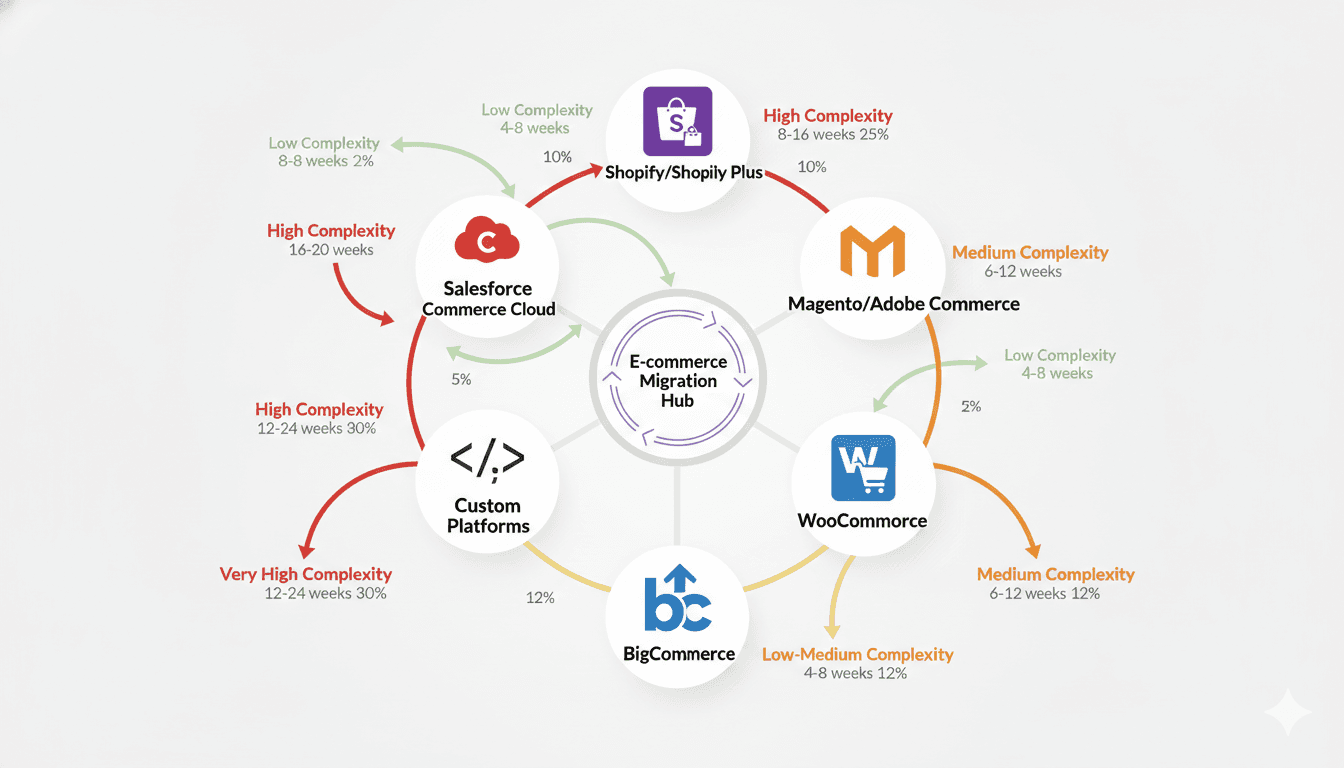
Magento to Shopify Plus
Magento's power comes with complexity. Many mid-market businesses find maintenance overwhelming.
Shopify Plus offers enterprise features without infrastructure headaches. Hosting, security, and updates happen automatically.
The tradeoff? Less customization flexibility. Shopify's architecture limits certain modifications. For most businesses, built-in features cover needs.
Migration complexity: Medium to High
Timeline: 8-16 weeks
Data challenges: Custom attributes require mapping, complex product relationships need restructuring
WooCommerce to Shopify
WordPress flexibility attracts startups. But WooCommerce performance degrades as catalogs grow.
Shopify provides dedicated ecommerce infrastructure. Speed improvements happen immediately after migration. According to WooCommerce performance studies, page load times significantly impact conversion rates.
The main challenge involves plugin dependencies. WooCommerce sites often use 15-20 plugins. Finding Shopify equivalents or custom solutions takes time.
Migration complexity: Medium
Timeline: 6-12 weeks
Data challenges: WordPress content structure differs significantly from Shopify's organization
BigCommerce to Shopify
Less common but growing. Businesses migrate for Shopify's app ecosystem and easier management.
Both platforms target similar markets. Data structures align reasonably well. Migration tends smoother than other paths.
Migration complexity: Low to Medium
Timeline: 4-8 weeks
Data challenges: Minimal, mostly involves recreating customizations and design elements
Custom Platform to SaaS Solution
Custom-built stores offer ultimate flexibility. They also require constant developer resources.
Moving to Shopify, BigCommerce, or similar platforms trades customization for reliability and lower maintenance.
These migrations demand the most planning. Custom databases need complete restructuring. Unique features require rebuilding or alternative solutions.
Migration complexity: Very High
Timeline: 12-24 weeks
Data challenges: Everything requires custom extraction, transformation, and loading
Salesforce Commerce Cloud Migrations
Enterprise businesses sometimes leave Salesforce Commerce Cloud for cost reasons. Implementation and maintenance expenses can reach hundreds of thousands annually.
Shopify Plus or Adobe Commerce provide comparable features at lower total cost of ownership.
Migration complexity: High
Timeline: 16-20 weeks
Data challenges: Complex data relationships and extensive customizations
Migration Path | Complexity Level | Typical Timeline | Primary Challenge |
|---|---|---|---|
Magento → Shopify Plus | High | 8-16 weeks | Custom functionality recreation |
WooCommerce → Shopify | Medium | 6-12 weeks | Plugin dependency mapping |
BigCommerce → Shopify | Medium | 4-8 weeks | Design and customization rebuild |
Custom → SaaS | Very High | 12-24 weeks | Complete data restructuring |
Salesforce → Other | High | 16-20 weeks | Integration complexity |
Considering a platform switch? Use our app cost calculator to estimate your migration investment.
The Ecommerce Website Migration Process
Successful migrations follow structured approaches. Skipping steps causes problems.
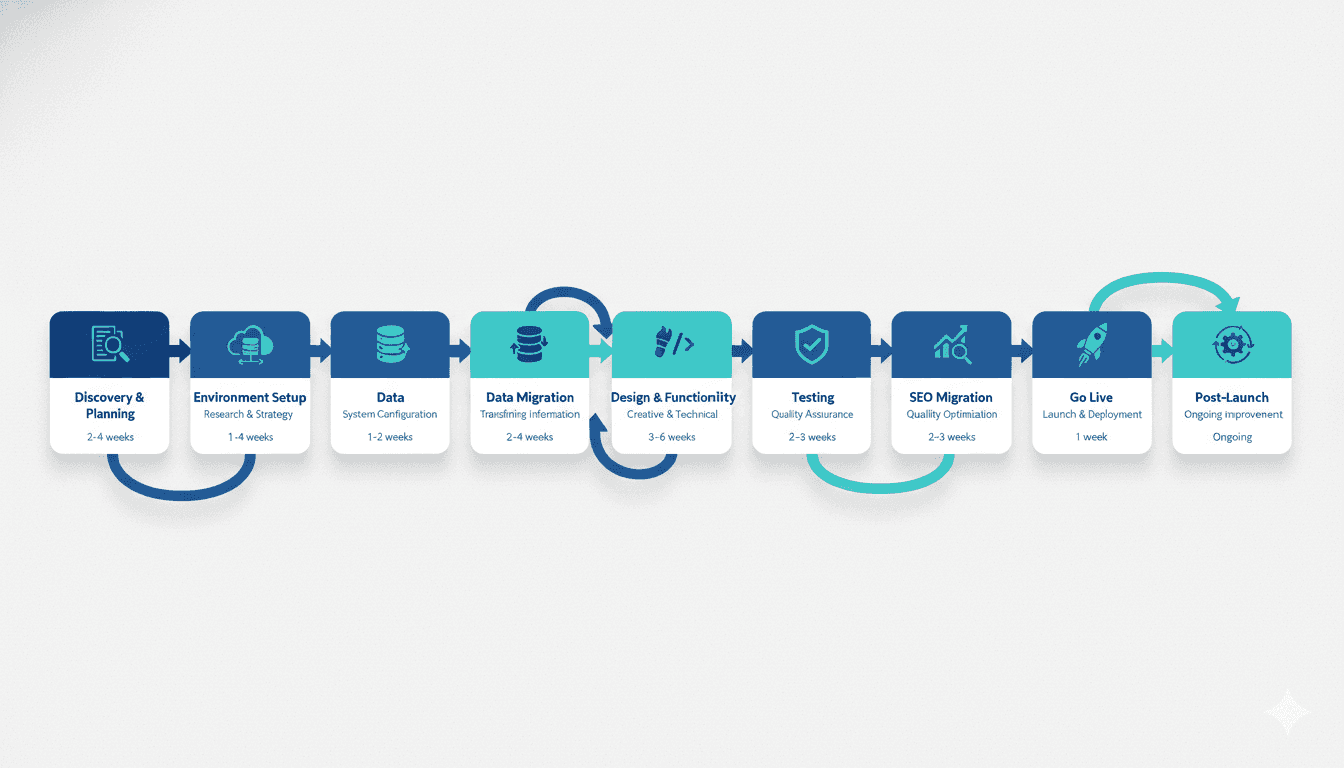
Phase 1: Discovery and Planning
Platform selection comes first. Not all platforms fit all businesses. Requirements gathering determines the best match.
Consider catalog size, traffic volume, international needs, B2B capabilities, integration requirements, and growth projections. Platform selection drives everything else.
Current state audit documents what exists. Product counts, customer records, order volumes, custom features, integrations, and content inventory.
This audit reveals migration complexity. A store with 500 products and 3 integrations migrates faster than one with 50,000 SKUs and 20 custom connections.
Gap analysis compares current features against new platform capabilities. Some functionality transfers directly. Some needs workarounds. Some requires custom development.
Migration strategy defines the approach. Big bang migrations switch everything at once. Phased migrations move sections gradually. Parallel running operates both platforms temporarily.
Timeline creation sets realistic expectations. Rush jobs cause errors. Adequate planning prevents disasters.
Phase 2: Environment Setup
New platform configuration establishes the destination. Account creation, domain setup, basic settings, payment gateway connections, and shipping rules.
Staging environment provides safe testing space. Never migrate directly to production. Staging lets you fix issues before customers see them.
Backup creation protects existing data. Multiple backups across different locations ensure recovery options if something fails.
Phase 3: Data Migration
Data extraction pulls information from the current platform. APIs work for some platforms. Direct database access works for others. Manual exports handle edge cases.
Data cleaning removes problems before transfer. Duplicate customers, discontinued products, corrupted records, and incomplete information get fixed now.
Data transformation converts information to new format requirements. Field mapping ensures data lands in correct locations. Product attributes, customer fields, and order details all need proper mapping.
Data loading imports everything into the new platform. Automated tools handle bulk transfers. Manual processes manage special cases.
Validation confirms accuracy. Product counts match. Customer records contain complete information. Order histories display correctly.
Phase 4: Design and Functionality
Theme selection or custom design creates the store's appearance. Existing designs can recreate on new platforms. Redesigns modernize the look simultaneously.
Feature implementation builds needed functionality. Product filters, search capabilities, account features, and checkout processes.
Integration connection links external services. Email marketing platforms, accounting software, inventory systems, shipping solutions, and analytics tools.
Custom development handles unique requirements. Specialized features often need coding rather than using built-in options.
Phase 5: Testing
Functional testing verifies everything works. Add products to cart. Complete checkout. Create accounts. Process returns. Test every customer-facing feature.
Data verification double-checks migration accuracy. Sample product data across categories. Review customer accounts. Confirm order histories.
Performance testing measures speed. Page load times, checkout speed, and search responsiveness under various traffic levels.
Integration testing confirms third-party connections. Payment processing, shipping calculations, email sends, and inventory updates.
Security testing validates protection measures. SSL certificates, payment security, data encryption, and access controls.
Phase 6: SEO Migration
URL mapping connects old addresses to new ones. Every product, category, and content page needs proper mapping.
301 redirect implementation tells search engines about moves. Preserves link equity and ranking signals.
Metadata migration transfers titles, descriptions, and structured data. These elements took time to optimize. Don't lose them.
Sitemap submission informs search engines about the new structure. Speeds up reindexing and ranking restoration.
Phase 7: Go Live
Final data sync captures recent changes. Orders placed during migration, new customers, inventory updates.
DNS changes point domain to new platform. This step makes the switch official.
Monitoring watches for problems. Traffic patterns, error rates, conversion tracking, and customer support tickets.
Quick fixes address immediate issues. No migration goes perfectly. Rapid response prevents customer impact.
Phase 8: Post-Launch Optimization
Performance optimization fine-tunes speed. Image compression, code minification, caching configuration.
Conversion rate optimization improves results. A/B testing, checkout refinement, and user experience enhancements.
Training teaches team members the new system. Admin interface, order processing, product management, and customer service tools.
Documentation captures processes and decisions. Future team members need this information.
Need expert guidance through your migration? Connect with Deliverables Agency's migration specialists for end-to-end support.
Cost of Migrating an Ecommerce Platform
Migration costs vary wildly based on complexity. Understanding factors helps budget accurately.
Store Size and Complexity
Small stores with under 1,000 products and basic functionality typically cost $2,000 to $15,000. Simple data structures, minimal customizations, and standard integrations keep costs down.
Medium stores ranging from 1,000 to 10,000 products with moderate complexity run $5,000 to $25,000. More products mean more data validation. Additional integrations increase configuration time.
Large stores exceeding 10,000 products with complex requirements cost $10,000 to $40,000+. Extensive catalogs require careful migration planning. Custom features need rebuilding. Multiple integrations demand thorough testing.
Enterprise migrations for very large operations can exceed $50,000. Custom platforms, complex integrations, international operations, and specialized requirements drive costs higher.
Platform Choices Impact Pricing
SaaS platforms like Shopify or BigCommerce generally cost less to migrate to. Their standardized structures simplify data mapping. Built-in features reduce custom development needs.
Open source platforms like Magento or WooCommerce offer flexibility but require more technical work. Setup complexity, hosting configuration, and security hardening add costs.
Custom platforms as destinations dramatically increase expenses. Everything needs building from scratch. No templates or pre-built features exist.
Customization Requirements
Standard migrations using platform defaults and minimal customization stay affordable. Out-of-the-box features handle most needs.
Custom functionality raises costs significantly. Unique checkout processes, specialized product configurators, complex pricing rules, or custom B2B features require development time.
Each custom feature typically adds $2,000 to $10,000+ depending on complexity.
Design Considerations
Theme-based designs using purchased or free templates minimize costs. Minor customization keeps expenses reasonable.
Custom designs built specifically for your brand increase investment. Unique layouts, custom interactions, and brand-specific features add development time.
Design work typically ranges from $2,000 for template customization to $20,000+ for fully custom builds.
Integration Complexity
Basic integrations with common platforms usually include simple setup. Payment processors, shipping calculators, and email marketing tools often have native connections.
Custom integrations with proprietary systems, legacy software, or unusual services require API development. Each custom integration typically costs $1,000 to $5,000.
Enterprise integrations connecting ERP systems, advanced inventory management, or complex order management systems can cost $10,000 to $30,000+.
SEO Preservation Work
Basic SEO migration covering URL mapping and redirects typically costs $1,000 to $3,000. This includes creating redirect maps and implementing 301 redirects.
Advanced SEO work with metadata migration, structured data implementation, and ranking monitoring adds $2,000 to $5,000.
Skipping SEO work saves money initially but costs far more in lost rankings and traffic. Following Google's site migration guidelines ensures search rankings remain protected.
Data Migration Complexity
Clean data in standard formats migrates easily. Simple product structures, basic customer fields, and straightforward order histories.
Complex data with custom attributes, relationship hierarchies, multiple product types, and intricate pricing structures requires extensive mapping work.
Data cleaning and transformation can add $1,000 to $10,000 depending on complexity.
Testing and Quality Assurance
Basic testing covers essential functionality. Core features, checkout process, and data accuracy verification typically include standard project cost.
Comprehensive testing examining edge cases, stress testing, security audits, and extensive quality assurance adds $2,000 to $10,000.
Thorough testing prevents expensive post-launch fixes.
Ongoing Platform Costs
Migration cost calculations should include post-launch expenses.
Platform subscriptions vary dramatically. Shopify plans range from $29/month to $2,000+/month for Plus. BigCommerce runs $29 to $300+/month for standard plans and custom pricing for Enterprise. Magento Community Edition is free but requires hosting.
Hosting costs apply to self-hosted solutions. Quality managed hosting ranges from $100 to $500+/month depending on traffic and resource needs.
Maintenance and updates require ongoing investment. SaaS platforms handle this automatically. Self-hosted solutions need developer time for updates, security patches, and optimization.
Cost Breakdown Example
Here's a realistic cost breakdown for a medium-sized store migration:
Migration Component | Cost Range |
|---|---|
Platform setup and configuration | $1,000 - $2,000 |
Data migration and validation | $2,000 - $10,000 |
Design implementation | $2,000 - $15,000 |
Custom feature development | $1,000 - $5,000 |
Integration setup | $2,000 - $8,000 |
SEO preservation | $1,000 - $5,000 |
Testing and QA | $2,000 - $5,000 |
Training and documentation | $1,000 - $3,000 |
Project management | $3,000 - $7,000 |
Total | $15,000 - $50,000 |
Hidden Costs to Consider
Downtime losses if migration causes outages. Even a few hours offline during peak season costs thousands in lost sales.
Team time spent managing the project. Internal staff hours add up quickly even with external help.
Content creation for new platform requirements. Different platforms need different content formats.
Training time while teams learn new systems. Productivity dips temporarily during adjustment periods.
App subscriptions for new platform capabilities. Apps solving specific needs often require monthly fees.
Choosing the Right Ecommerce Migration Service Provider
Partner selection determines migration success more than any other factor. Great providers prevent problems. Poor ones create disasters.
Experience with Your Platforms
Source platform expertise matters critically. Providers must deeply understand your current system. They need to extract data properly, understand custom features, and anticipate migration challenges.
Destination platform certification indicates proper training. Shopify Partners, BigCommerce Partners, and Adobe Solution Partners receive advanced technical training. Find certified partners through Shopify's Partner Directory or Adobe Commerce Partner Program.
Platform-specific experience prevents rookie mistakes. Providers who've migrated your specific platform combination 20+ times know potential problems before they appear.
Project Portfolio and Case Studies
Similar project experience reveals capability. Review past migrations matching your complexity level. A provider handling enterprise migrations brings different skills than one working with small stores.
Industry knowledge helps providers understand your specific needs. Fashion retailers need different features than B2B industrial suppliers.
Client references provide honest feedback. Speak with businesses that completed similar migrations. Ask about communication, problem-solving, deadline adherence, and post-launch support.
Technical Capabilities
Development skills enable custom feature creation. Complex migrations almost always require some custom development.
Integration experience ensures third-party connections work properly. Providers should know common platforms like email marketing tools, accounting software, and inventory systems.
SEO expertise preserves rankings. Technical SEO knowledge prevents traffic losses that cost far more than migration expenses.
Migration Methodology
Structured processes demonstrate professional approach. Ad-hoc migrations invite problems. Ask about discovery processes, testing protocols, quality assurance steps, and launch procedures.
Testing rigor separates good providers from great ones. Comprehensive testing catches issues before customers do.
Risk management planning shows maturity. What happens if problems arise? How do they handle unexpected issues?
Communication and Project Management
Clear communication prevents misunderstandings. How often do they provide updates? Who serves as your point of contact? What does escalation look like?
Project management tools keep everyone aligned. Shared dashboards, task tracking, and timeline visibility help projects stay on track.
Transparency about challenges builds trust. Providers should flag potential issues early rather than hiding problems.
Support and Maintenance
Post-launch support matters enormously. Migrations always have some post-go-live adjustments. Understanding support terms prevents surprises.
Training offerings help teams adapt to new systems. Proper training reduces support tickets and improves efficiency.
Long-term partnership potential adds value. Working with providers who can support ongoing optimization creates continuity.
Pricing and Contracts
Transparent pricing eliminates surprise costs. Detailed proposals breaking down costs by component help evaluate value.
Fixed-price agreements reduce risk for defined projects. Time-and-materials pricing works better for uncertain scopes.
Payment terms should align with milestones. Avoid paying everything upfront. Stage payments based on completion protect both parties.
Warning Signs to Avoid
Unrealistic timelines indicate inexperience. Complex migrations need adequate time. Promises of two-week enterprise migrations should raise red flags.
Vague proposals lacking detail suggest poor planning. Quality providers document specific deliverables, timelines, and responsibilities.
No reference clients could mean limited experience or unhappy customers. Established providers happily share references.
Pressure tactics pushing quick decisions indicate questionable business practices. Professional firms give time to evaluate options.
Lowest bids often reflect cut corners. Migration quality matters far more than saving a few thousand dollars. Budget constraints are valid, but suspiciously low pricing deserves scrutiny.
Ready to find the perfect migration partner? Contact Deliverables Agency for a consultation and detailed migration proposal.
Common Ecommerce Migration Challenges and Solutions
Every migration faces obstacles. Knowing them beforehand enables better planning.
Data Integrity Issues
Challenge: Data corruption during transfer causes product errors, missing customer information, or incorrect order histories. One wrong field mapping puts prices in description fields or mixes customer addresses.
Solution: Multiple validation checkpoints catch problems early. Compare record counts between platforms. Sample-check data across all entity types. Use automated validation scripts for large datasets. Create data dictionaries mapping every field before migration starts.
Downtime and Revenue Loss
Challenge: Store outages during migration cost sales. Holiday season migrations during peak traffic prove especially costly. Even planned maintenance frustrates customers.
Solution: Staging environments enable complete testing before going live. DNS propagation strategies minimize public downtime to minutes rather than hours. Maintenance mode pages with email capture convert some waiting visitors. Schedule migrations during lowest traffic periods based on analytics data.
SEO Ranking Drops
Challenge: URL structure changes confuse search engines. Missing redirects create dead links. Lost metadata erases optimization work. Rankings can drop 30-50% without proper SEO migration.
Solution: Comprehensive URL mapping before launch. 301 redirects for every changed page. Metadata migration including titles, descriptions, and structured data. XML sitemap submission immediately after launch. Search Console monitoring for crawl errors. Pre-migration SEO audit identifying optimization opportunities.
Integration Failures
Challenge: Payment processors fail at checkout. Shipping calculators show wrong rates. Email automations don't trigger. Inventory doesn't sync. Each broken integration frustrates customers and costs sales.
Solution: Test every integration thoroughly before launch. Process real transactions in test mode. Verify data flows bidirectionally for inventory and order systems. Document API credentials and configuration for quick troubleshooting. Have vendor support contacts ready during launch.
Custom Feature Loss
Challenge: Unique functionality from old platform doesn't exist on new one. Custom product configurators, specialized calculators, unique checkout processes, or proprietary tools require rebuilding.
Solution: Document all custom features during discovery. Evaluate each feature's business value. Some features prove unnecessary and can retire. Important features need custom development or alternative solutions. Build custom features early in timeline allowing testing time.
Performance Problems
Challenge: New platform loads slower than expected. Image optimization gets overlooked. Theme code contains inefficiencies. Database queries run poorly.
Solution: Performance testing before launch reveals issues. Image compression and proper formatting. Code review and optimization. CDN implementation for static assets. Caching configuration. Load testing simulates traffic spikes.
Team Training Gaps
Challenge: Staff struggles with new admin interface. Order processing takes longer. Product updates get delayed. Customer service can't find information quickly.
Solution: Structured training sessions before launch. Role-specific training focusing on each team's needs. Documentation and quick reference guides. Gradual rollout letting small groups learn first. Post-launch support for questions.
Budget Overruns
Challenge: Projects exceed initial estimates. Scope creep adds features mid-project. Unexpected technical challenges require more development time. Timeline extensions increase costs.
Solution: Detailed discovery phase documents requirements thoroughly. Change order processes for scope additions. Contingency budgets for unexpected issues. Regular budget reviews with stakeholders. Clear prioritization of must-have versus nice-to-have features.
Content Migration Complexity
Challenge: Blog posts, landing pages, and content libraries need migration. Rich media content, embedded videos, and special formatting often break during transfer. Content URL structures change affecting internal linking.
Solution: Content audit before migration identifies all pages. Content migration tools for bulk transfers. Manual review of important pages. URL mapping for all content pages, not just products. Internal link updates pointing to new URLs.
Third-Party App Compatibility
Challenge: Apps and plugins from old platform don't exist on new one. Finding equivalent functionality takes time. Some features require custom development instead of apps.
Solution: App inventory during discovery phase. Research available apps on new platform before committing. Test critical apps in staging environment. Budget for custom development if necessary apps don't exist.
Maintaining Business Continuity During Migration
Revenue keeps flowing during migrations when properly planned.
Staging Environment Strategy
Parallel operations let both stores run temporarily. Old store handles orders while new store undergoes testing. Customers see no disruption.
Synchronization challenges emerge with parallel running. Inventory updates need mirroring across platforms. Order data requires capturing everywhere. Time limitations exist for how long parallel operations can run practically.
Communication Plans
Customer notification manages expectations. Announce planned maintenance windows. Explain potential temporary issues. Provide support contact information.
Email announcements should go to customer list days before migration. Website banners warn visitors about upcoming changes. Social media posts reach broader audiences.
Team briefings keep staff informed. Explain what's changing and when. Provide troubleshooting resources. Ensure everyone knows escalation procedures.
Order Management During Transition
Order processing protocols prevent fulfillment gaps. Decide where orders process during migration. Consider freezing new orders during actual cutover if downtime is minimal.
Inventory synchronization prevents overselling. If running parallel stores, real-time inventory updates across both systems are critical.
Customer service preparation equips support teams for questions. Common issues to expect. Quick fixes for typical problems. Clear escalation paths for complex situations.
Backup and Rollback Plans
Full backups before any major changes enable recovery. Database backups, file system backups, and configuration backups.
Rollback procedures get documented before launch. If catastrophic issues appear, reverting to old platform might become necessary. DNS changes reverse quickly. Customer communication templates prepare for this scenario.
Gradual Rollout Options
Soft launches to limited audiences reduce risk. Start with employee testing, then beta customer groups, before full public launch.
Geographic rollouts switch regions progressively. International stores can migrate one country at a time.
Customer segment rollouts migrate wholesale customers before retail, or vice versa based on business priorities.
Post-Launch Monitoring
Real-time monitoring catches issues immediately. Error tracking, conversion funnel monitoring, and payment processing alerts.
Support ticket tracking identifies patterns. Multiple customers reporting same issue signals underlying problems.
Performance monitoring ensures speed remains acceptable. Page load times, server response times, and checkout completion rates.
Data Security and Compliance in Ecommerce Migration
Data protection isn't optional during migrations. Security failures create legal and financial disasters.
PCI Compliance Requirements
Payment data handling during migration needs extreme care. Never store credit card numbers in plain text. Tokenized payment data transfers safely. Full card numbers should never appear in migration files.
PCI DSS standards apply throughout migration. Secure data transmission, encrypted storage, access controls, and audit trails.
Compliance documentation proves adherence to standards. Migration providers should maintain PCI compliance and provide documentation.
Customer Data Protection
Personal information security protects customer privacy. Names, addresses, email addresses, phone numbers, and purchase histories need encryption during transfer.
GDPR compliance for European customers requires specific protections. Right to erasure means deleted customer data must not migrate. Consent documentation should transfer with customer records.
Data minimization principles suggest migrating only necessary information. Historical data older than retention requirements can archive instead of migrate.
Encryption Standards
Data in transit requires encryption. SFTP for file transfers. TLS for API connections. Never transfer sensitive data over unencrypted channels.
Data at rest needs encryption too. Database encryption for stored information. Encrypted backups for migration files.
Access Controls
Principle of least privilege limits who sees sensitive data. Migration team members get access only to necessary information. Customer credit cards stay completely off limits.
Authentication requirements protect migration environments. Strong passwords, two-factor authentication, and IP restrictions for admin access.
Audit logging tracks all data access. Who accessed what data when. Helps identify security issues and provides compliance evidence.
Vendor Security Evaluation
Security certifications indicate serious security practices. SOC 2 compliance, ISO 27001 certification, and PCI DSS compliance.
Security questionnaires reveal vendor practices. Ask about encryption standards, access controls, employee screening, incident response procedures, and data center security.
Data processing agreements formalize security responsibilities. Who owns data at each stage? What happens to data after migration completes? When does data deletion occur?
Backup Security
Encrypted backups prevent data exposure. Backup files contain complete datasets making them attractive targets.
Backup storage requires secure locations. Separate physical locations from production systems. Access controls preventing unauthorized retrieval.
Backup retention follows data protection regulations. Don't keep migration backups indefinitely. Documented retention and destruction policies.
Breach Response Planning
Incident response plans prepare for worst case. How does the team respond to suspected breaches? Who gets notified? What are customer communication requirements?
Notification requirements vary by jurisdiction. GDPR requires breach notification within 72 hours. US state laws have different requirements. Know obligations before problems arise.
Future Proofing Your Ecommerce Platform
Migration offers opportunity to set up for long-term success.
Scalability Considerations
Traffic capacity should exceed current needs. Plan for growth. What looks sufficient today might constrain next year. Choose platforms and hosting handling 3-5x current traffic.
Product catalog limits need room for expansion. If you have 5,000 products now, choose solutions handling 20,000+ comfortably.
International expansion capabilities matter for growing businesses. Multi-currency support, multi-language features, regional inventory management, and international shipping capabilities.
Technology Stack Decisions
API-first architecture enables flexibility. Headless commerce separates frontend presentation from backend logic. Easier to redesign customer experiences without rebuilding entire systems.
Integration capabilities future-proof operations. Open APIs and extensive app marketplaces provide connection options as needs evolve.
Mobile commerce optimization proves essential. Mobile shopping dominates ecommerce. Progressive web apps, mobile-optimized checkouts, and app integrations serve mobile customers.
Marketing Technology Integration
Omnichannel capabilities meet customer expectations. Customers shop across channels. Unified inventory, consistent pricing, and seamless experiences across web, mobile, social, and physical locations.
Personalization engines improve conversion rates. Product recommendations, dynamic content, and personalized experiences based on customer behavior.
Marketing automation connections drive revenue. Email marketing platforms, SMS marketing, loyalty programs, and customer data platforms.
Analytics and Reporting
Comprehensive analytics inform decisions. Traffic sources, conversion funnels, customer lifetime value, product performance, and revenue attribution.
Custom reporting capabilities serve specific business needs. Pre-built reports rarely answer all questions. Flexible reporting or data warehouse connections enable deep analysis.
Real-time dashboards monitor business health. Key metrics visible at a glance help teams respond quickly to opportunities and problems.
Flexibility for Future Changes
Easy theme changes allow design evolution. Businesses update looks every few years. Platforms supporting theme changes without full migrations save future costs.
App ecosystem depth provides solutions for emerging needs. Rich app marketplaces mean new capabilities without custom development.
Developer community size indicates long-term support. Large communities produce more resources, more apps, and more available talent for future projects.
Conclusion
Ecommerce platform migration transforms businesses when done right. The process demands careful planning, experienced execution, and thorough testing.
Your current platform probably served you well initially. Growth changes requirements. Technology advances. Customer expectations evolve. Migration gives your business the foundation needed for the next growth phase.
The investment proves worthwhile for businesses outgrowing current platforms. Better performance means higher conversion rates. Modern features improve customer experience. Scalability supports growth without constant technical limitations.
Success requires choosing the right platform, partnering with experienced providers, planning thoroughly, and executing carefully. Shortcuts create expensive problems. Proper migration delivers returns for years.
Ready to move your ecommerce business forward? The right platform and expert guidance make migration smooth and successful.
Have an Idea for an App or Website?
At Deliverables, we specialize in building custom digital products that solve real-world problems. Tell us your idea, and our expert team will help you craft a plan to build your dream.
Some Topic Insights:
How long does ecommerce platform migration take?
Most migrations take 6 to 16 weeks depending on complexity. Small stores with under 1,000 products and basic features can complete in 4 to 6 weeks. Medium-sized stores typically need 8 to 12 weeks. Large stores with over 10,000 products and complex customizations require 12 to 24 weeks. Timeline factors include data volume, custom feature complexity, integration requirements, design needs, and testing thoroughness. Rush migrations increase error risk significantly.