


Time to read :
1 min read
Your company’s old servers are still running in a backroom and handling years of stored data. Whereas your competitors are moving faster, launching new products, and adjusting to market changes, just because they have considered the cloud migration.
It's not about shifting data, but about how your business operates. If done right, it can boost agility, cut costs, and even drive innovation. According to some recent studies, companies that have migrated to the cloud have witnessed a decrease in error rates by 25% percent. Therefore, they are adapting rapidly. Its market is expected to increase by USD 17.76 billion by 2029.
However, without a solid plan, the move can lead to downtime, security issues, and frustrated teams. That is why understanding key cloud migration considerations is crucial.
In this blog, we will break down the six essential steps to help you create a successful cloud migration strategy.
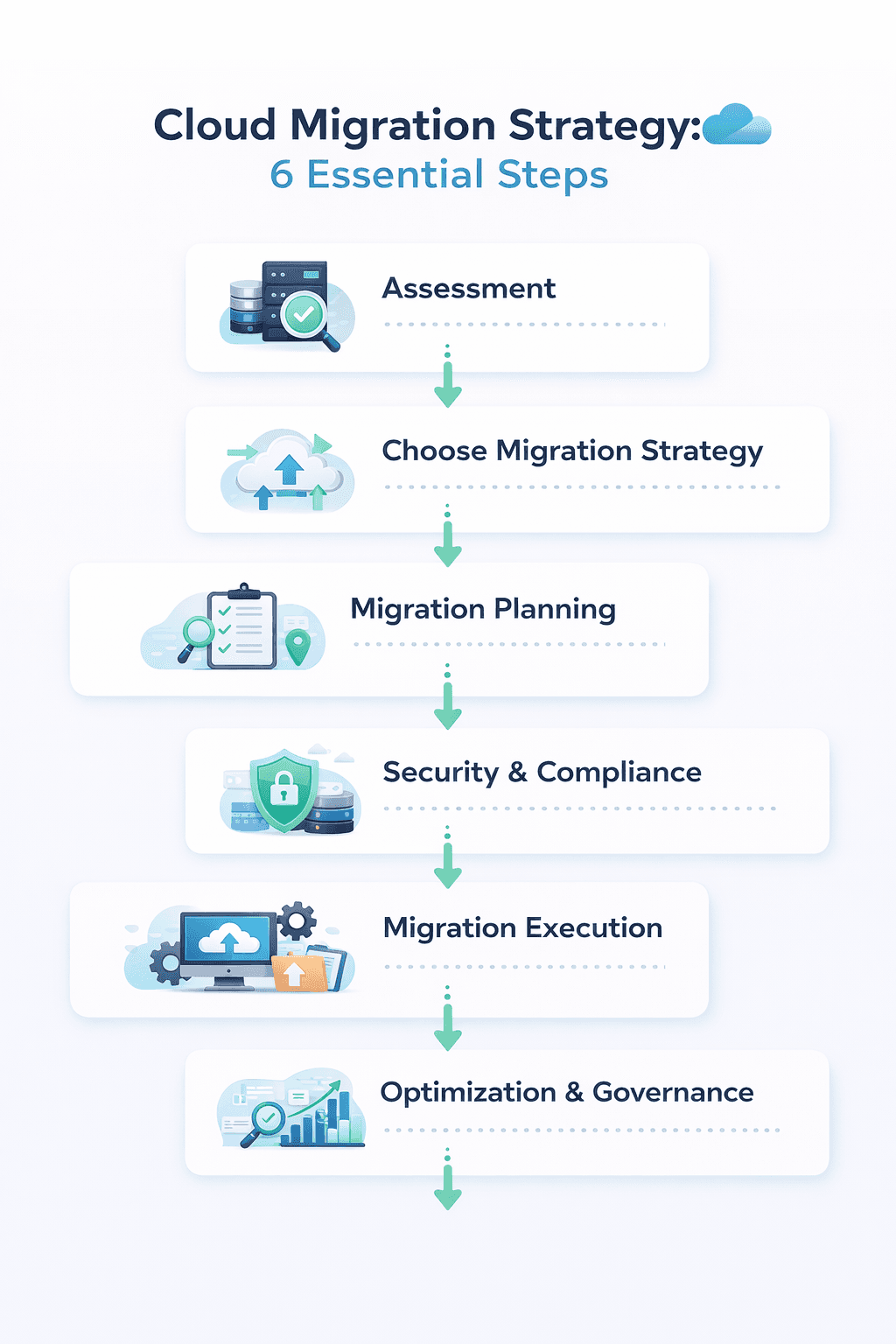
Step 1: Assess Your Current Environment and Define Clear Goals
Before moving anything to the cloud, it is important to understand where your business stands today. This includes knowing how everything works together, what’s essential for performance, and which business goals will guide your migration plan.
Why Assessment Matters
Setting clear baseline metrics is one of the keys to a successful cloud migration. Without them, you are moving forward without direction. You need to measure things like page load speed, response times, CPU and memory usage, and even conversion rates. These will act as your key performance indicators (KPIs) once the migration is complete.
What to Include in Your Assessment
In your assessment, ensure to include:
Complete Inventory: List all your software, hardware, databases, security tools, current cloud services, and your IT team’s skill sets.
Application Dependencies: Understand how different systems connect. Even a simple CRM might rely on several other tools or databases.
Performance Baselines: Record your current performance metrics so you can compare results after migration.
Security and Compliance: Identify which systems handle sensitive or regulated data to ensure compliance during and after migration.
Business Goals Alignment: Be clear about your objectives. Do you want to cut costs, improve scalability, boost security, or speed up innovation?
Many cloud providers offer pre-migration assessments to help with this stage. Deliverables cloud consulting services give organizations a detailed cloud roadmap, cost and ROI estimates, and a step-by-step migration plan based on existing dependencies. This kind of expert insight can save you months of trial and error and set your migration up for success.
Step 2: Choose the Right Migration Strategy and Cloud Provider
Not every business follows the same path when moving to the cloud. The right strategy depends on your applications, budget, timeline, and long-term goals. One of the key cloud migration considerations is understanding the different types of migration approaches, commonly known as the 6 R’s. Each approach has its own benefits, challenges, and use cases.
The Six Migration Strategies
1. Rehosting (Lift-and-Shift)
This is the fastest way to move to the cloud. You simply migrate your applications without changing their structure. It is ideal if you need quick results or if your systems can already perform well in a cloud environment. The only disadvantage of this approach is that you would not fully benefit from advanced cloud features like auto-scaling or managed databases right away.
2. Replatforming (Lift-Tinker-and-Shift)
This strategy involves making small improvements during the migration to optimize performance. You might move your database to a service like Amazon RDS or shift to a containerized setup. Companies using this approach modernized their legacy applications and saw a significant boost in their performance.
3. Repurchasing (Moving to SaaS)
Sometimes, it’s better to replace an existing on-premises system with a cloud-based software-as-a-service (SaaS) solution. This approach simplifies management and reduces maintenance costs.
4. Refactoring (Re-architecture)
This is the most complex, but the most rewarding approach. Here, you redesign your applications to be fully cloud-native. You might rebuild them into microservices or use serverless technology. Though this takes more time and investment, it delivers long-term benefits like better scalability, agility, and reliability.
5. Retiring (Decommisioning)
During your assessment, you will likely find outdated or unused applications. Removing them helps cut costs and simplifies your migration. This lets your team focus on systems that truly support your business goals.
6. Retaining (Keeping On-Premises)
Not every system needs to move right away. Some applications may need to stay on-premises due to compliance, performance, or business reasons. These can always be revisited later in your cloud migration process when the timing is right.
Selecting Your Cloud Provider
Not all cloud providers are created equal. When evaluating options like AWS, Microsoft Azure, or Google Cloud Platform, consider:
Support for public, private, and hybrid/multicloud environments
Tools and automation capabilities for seamless migration
Compliance certifications (HIPAA, GDPR, PCI-DSS, etc.)
Pricing models and cost calculators (AWS Pricing Calculator, Azure Pricing Calculator)
Geographic availability and data residency requirements.
Step 3: Plan Your Migration Approach and Timeline
Now, you need to build a detailed migration plan. It will be a complete roadmap that outlines dependencies, potential risks, resource needs, and backup plans to ensure a smooth transition.
Adopt a Phased Approach
Gone are the days of moving everything to the cloud all at once. Taking a phased approach reduces risk, keeps your operations running, and allows your team to learn as they go. Start with low-risk, high-value applications that can show quick wins, then move on to more complex systems.
Build a Migration Business Case
It is important to present a clear business case to gain support from stakeholders. Highlight benefits like better agility, stronger security, and potential cost savings. Use pricing calculators from your cloud provider to estimate costs and show realistic ROI projections. Be upfront about expenses for implementation, staff training, and expected payback timelines.
Address Data Interoperability
A common challenge in migration is data interoperability. Different systems often use different formats, which can lead to delays or even data loss. Before moving data, standardize formats and protocols to ensure everything integrates smoothly. Adopting a cloud-agnostic approach also prevents vendor lock-in and provides more flexibility for future changes.
Partnering with experienced cloud migration services can simplify this stage. These experts help you design phased plans, validate data integrity, and ensure your systems run efficiently once moved to the cloud.
Step 4: Ensure Robust Security and Compliance
Security is one of the key considerations for cloud migration. While major cloud providers offer strong built-in protections, it is crucial to understand your own responsibilities within the shared responsibility model.
Key Security Considerations
Before starting your migration, ensure you have addressed these essential security areas:
Data Ownership: Confirm that your organization retains complete control over all data stored in the cloud. Review your provider’s policies on data portability and any costs for retrieving your data.
Encryption Practices: Ensure your data is encrypted both while being transferred and while stored. Verify that your cloud provider follows strong encryption standards.
Access Controls: Use multi-factor authentication (MFA), role-based permissions, and the principle of least privilege to limit access only to what’s necessary.
Advanced Security Tools: Strengthen protection with tools like Unified Threat Management (UTM), Security Information and Event Management (SIEM), and Managed Endpoint Detection and Response (MEDR).
Compliance Certifications: Check that your provider complies with key regulations like HIPAA, GDPR, and PCI-DSS, and ensure your organization maintains ongoing compliance.
Disaster Recovery and Business Continuity
A strong disaster recovery (DR) plan is essential before and after your migration. The cloud makes DR more efficient. You can duplicate workloads across regions and enable automated failover. But you need a detailed plan that covers:
Defined Recovery Point Objective (RPO) and Recovery Time Objectives (RTO)
Automated backup schedules and regular testing
Clear roles and responsibilities for the IT and response teams
Communication protocols for internal staff and external partners
According to TierPoint’s research, cloud migration can significantly improve disaster recovery through Disaster Recovery as a Service (DRaaS). This improves both RPO and RTO metrics while ensuring business continuity even during unexpected outages.
Step 5: Execute the Migration with Precision
In this stage, your planning turns into action. A well-managed migration ensures minimal downtime, protects data integrity, and keeps everyone aligned throughout the cloud migration process. Execution determines how smoothly your systems transition to the new environment.
Automate Where Possible
Manual processes are slow, error-prone, and resource-intensive. Use automation tools like AWS Migration Hub, Azure Migrate, Cloud Endure, or River Meadow to simplify the process. They will help reduce human error, speed up timelines, and free up your IT team to focus on higher-value tasks like optimization and testing.
Monitor Performance Continuously
Before starting, establish clear performance baselines. Track key metrics during and after migration, like error rates, response times, throughput, network latency, CPU usage, and memory consumption. Continuous monitoring helps detect issues early and ensures smooth performance.
It is recommended to maintain visibility at all stages to identify bottlenecks, find optimization opportunities, and catch potential security vulnerabilities before they impact users.
Communicate Proactively
Transparency is essential. Keep all stakeholders informed about progress, planned downtime, and any workflow changes. Regular updates help manage expectations and build confidence in the process.
Prepare for Cutover
The production cutover is the final and most crucial moment of execution. Schedule it during off-peak hours, prepare a rollback plan in case of issues, and run a full test beforehand. You can also enforce a “freeze period” at least two weeks before cutover to prevent last-minute changes that might cause unexpected disruptions.
Step 6: Optimize and Continuously Improve
Migration is not the end of the process. The real benefits of the cloud come from continuous improvement, performance tuning, and cost management. Ongoing optimization is one of the key considerations for cloud migrations. It helps businesses get the maximum value from their investment.
Post-Migration Stabilization
Right after cutover, introduce a hypercare period lasting 2-4 weeks. During this phase, closely monitor performance, track IT and business KPIs, and confirm that systems are running smoothly. This way, you can identify and fix issues early. It also ensures your cloud environment meets all service-level agreements (SLAs) and operates within expected limits.
Cost Optimization
Cloud costs can rise quickly without control. Conduct regular cost reviews, identify unused resources, and “right-size” your instances to match actual workloads. Use savings plans, reserved instances, and auto-scaling policies to keep costs predictable. A well-structured cost optimization can help you stay within budget while maintaining strong performance.
Application Optimization
Now that your systems are in the cloud, take full advantage of what the platform offers. Refactor applications to use managed services, adopt containerization tools like Kubernetes, and explore serverless or AI-powered solutions. The goal is to move from simply hosting your apps in the cloud to making them truly cloud-native.
Establish Governance and FinOps Practices
Strong governance keeps your cloud environment organized and cost-effective. Set clear policies for provisioning resources, use tagging to track usage, and define chargeback or cost allocation models for different teams. Regular cloud usage reviews with stakeholders will help prevent cloud sprawl and ensure accountability.
Common Challenges (and How to Overcome Them)
Even with the best planning, cloud migrations can bring unexpected challenges. Here’s how to avoid the most common pitfalls and keep your project on track:
Lack of a Clear Strategy
Jumping into migration without a defined plan is one of the biggest mistakes companies make. Take the time to assess your current setup, identify goals, and map out a detailed strategy before moving anything. Proper planning upfront saves time, money, and frustration later.
Cost Management Complexity
Cloud pricing can be tricky. Track every expense, including development, hosting, licensing, and labor. Use monitoring tools to compare your actual spending against your budget. You can set up continuous cost monitoring from day one to avoid surprises.
Application Compatibility Issues
Older applications do not always work smoothly in cloud environments. Identify dependencies early, test integrations thoroughly, and be prepared to replatform or refactor applications to ensure compatibility and performance.
Vendor Lock-in Concerns
Relying too heavily on one cloud provider can limit flexibility. Therefore, use open standards and cloud-agnostic tools whenever possible. This gives you the freedom to switch providers or integrate multiple platforms if your business needs change.
Security and Compliance Gaps
Security must remain a top priority throughout your migration. Partner with providers that meet essential compliance standards, use strong encryption, implement role-based access controls, and schedule regular security audits. Involving cybersecurity experts early in the process ensures your data stays protected from the beginning.
Your Roadmap to Cloud Success
Cloud migration changes the way your business works, innovates, and grows. The most successful migrations share a few key traits. They are well-planned, strategic, and built on teamwork. They consider security important and see migration as the start of an ongoing improvement journey.
These cloud migration considerations remain the same, regardless of the size of the project. The cloud offers endless opportunities for flexibility, innovation, and growth, but success depends on having the right plan and the right partners by your side.
Have an Idea for an App or Website?
At Deliverables, we specialize in building custom digital products that solve real-world problems. Tell us your idea, and our expert team will help you craft a plan to build your dream.
Some Topic Insights:
What is a cloud migration strategy?
A cloud migration strategy is a structured plan that helps businesses move applications, data, and workloads from on-premises systems to a cloud environment. It defines the migration approach, tools, timeline, security requirements, and cost management to ensure a smooth and efficient cloud migration process.
What are the key considerations for cloud migration?
What are the 6 R’s of cloud migration?
How long does a cloud migration take?
What are the benefits of migrating to the cloud?