



Time to read :
1 min read
The timeline for Logistics Software Development depends on the size of the product, number of users, integrations, and level of automation you need. A simple logistics tool may take 3 to 5 months, while a larger platform with mobile apps, real-time tracking, route planning, warehouse tools, and several integrations can take 6 to 12 months or more.
A typical project follows these stages:
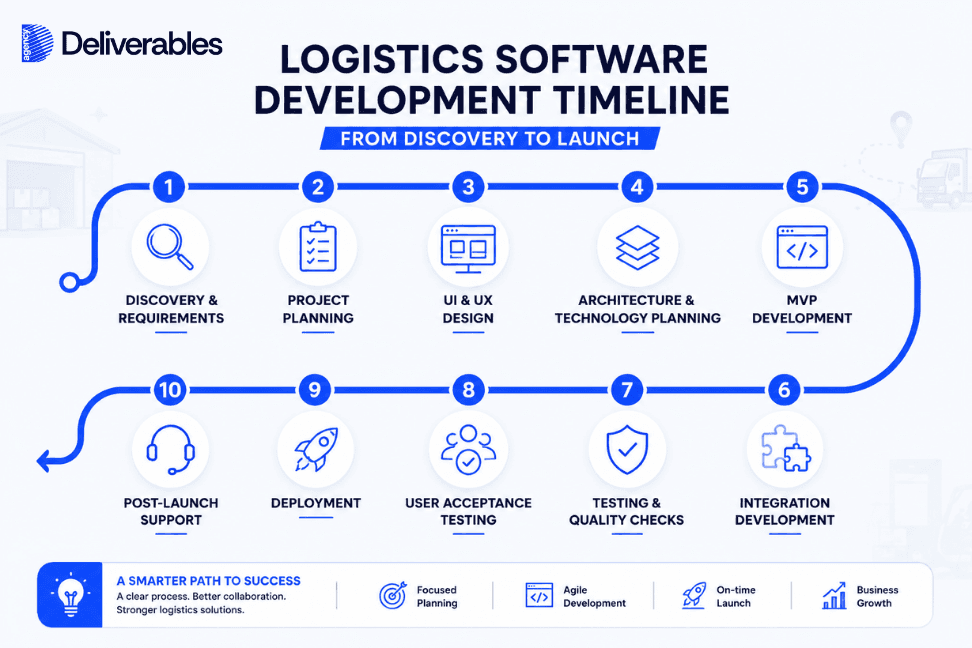
The important point is that development time should not be judged by the number of features alone. A feature that connects several systems can take more time than five simple screens.
At Deliverables Agency, we plan logistics software around the business workflow first. This gives the development team a clear scope and gives the client a more realistic timeline.
How Long Does Logistics Software Development Take?
For most projects, Logistics Software Development takes around 3 to 12 months, depending on the product.
Here is a practical estimate:
Project Type | Typical Timeline |
Basic logistics management tool | 3 to 4 months |
Fleet management platform | 4 to 6 months |
Delivery management platform | 4 to 7 months |
5 to 8 months | |
Full logistics management platform | 6 to 10 months |
Large enterprise logistics platform | 9 to 12+ months |
These are planning ranges, not fixed deadlines.
A project with 10 features can take longer than a project with 30 features if those 10 features involve complex rules, external APIs, live tracking, or several user types.
The best timeline comes after the requirements are clear.
What Affects the Logistics Software Development Timeline?
Before looking at each stage, it helps to understand what can increase or reduce the development time.
Number of user types
A system for one admin user is much simpler than one used by dispatchers, drivers, warehouse staff, managers, customers, and partners.
Each user may need a different dashboard or mobile experience.
Number of platforms
You may need:
Web application
Admin panel
Driver mobile app
Customer portal
Warehouse tablet app
Each platform adds design, development, testing, and maintenance work.
Integrations
Your software may need to connect with an ERP, CRM, WMS, GPS provider, payment gateway, e-commerce platform, or shipping API.
Each integration needs development and testing.
Real-time features
Live vehicle tracking, delivery status updates, driver locations, and instant alerts need more technical work than standard data management.
Business rules
A simple order assignment is easy.
A system that assigns orders based on driver location, vehicle capacity, delivery window, priority, working hours, and route limits is much more complex.
Scale
Software for 50 drivers has different requirements from software expected to support 5,000 drivers and millions of delivery records.
This is why a proper planning stage matters.
Stage 1: Discovery and Requirements
Estimated time: 1 to 3 weeks
The first stage is about understanding the business.
Before development begins, the team needs to know how logistics work inside your company.
We look at questions such as:
How are orders received?
Where are orders stored?
How are drivers assigned?
How are routes planned?
How are deliveries tracked?
What happens when a delivery fails?
How is proof of delivery recorded?
Which systems are already in use?
Who needs access to the software?
The team should also identify the main problems with the current process.
For example, a dispatcher may spend hours assigning drivers manually. Warehouse staff may enter the same order into two systems. Customers may call support because they cannot track deliveries.
These details help define what the software actually needs to do.
The result should be a clear requirements document, user roles, workflows, feature list, and initial project scope.
This stage may look small, but it can save weeks of development later.
Stage 2: Project Planning
Estimated time: 1 to 2 weeks
Once the requirements are clear, the project can be divided into smaller parts.
The team decides:
What goes into the first release?
Which features are most important?
What integrations are needed?
What technology will be used?
Which tasks depend on other tasks?
How will testing be handled?
What is the expected launch plan?
This is also where the project timeline becomes more realistic.
For example, you may want 25 features.
After reviewing the workflow, the team may find that only 12 are needed for the first release.
The remaining features can be planned for later versions.
This is often a better way to build logistics software because the business can start using the core system sooner.
Stage 3: UI and UX Design
Estimated time: 2 to 5 weeks
The next stage is designing how people will use the software.
Logistics software can have many users, so the design needs to match each role.
A dispatcher may need a large screen showing:
Active deliveries
Available drivers
Delayed orders
Delivery locations
Route information
A driver needs a much simpler mobile interface.
The driver may only need to see:
Today's deliveries
Customer address
Route
Delivery instructions
Delivery status
Proof of delivery
The warehouse team may need screens for inventory, picking, packing, and shipment preparation.
Good UX reduces the number of steps needed to complete common tasks.
At this stage, designers create wireframes and then move to the final interface.
The development team can then build from approved designs instead of making design decisions during coding.
Stage 4: Architecture and Technology Setup
Estimated time: 1 to 3 weeks
Before full development starts, the technical structure of the product needs to be planned.
This includes decisions around:
Frontend
Backend
Database
Cloud infrastructure
APIs
Authentication
User permissions
Data storage
Monitoring
Security
The architecture should match the size and needs of the business.
For example, a small internal logistics tool does not need the same infrastructure as a platform serving thousands of drivers across several countries.
The team should also plan how the system will handle future growth.
A good architecture makes it easier to add users, locations, integrations, and features later.
Stage 5: MVP Development
Estimated time: 8 to 16 weeks
This is usually the largest part of the project. The development team turns the approved designs and requirements into a working first version of the software.
During MVP development, the focus is on building the core features your logistics team needs to run daily operations. A logistics MVP may include:
User login
Order management
Driver management
Dispatching
Route planning
Delivery tracking
Delivery status
Proof of delivery
Basic reports
Admin controls
The exact feature set depends on the business and its main goals.
Development is normally split into smaller cycles. The team builds a group of features, tests them, reviews the results, and then moves to the next group.
This gives the client regular visibility into the project and makes it easier to find and fix issues before they affect the full product. It also allows the business to launch the core system first and add more features in later versions.
Stage 6: Integrations
Estimated time: 2 to 8+ weeks
Integrations can run alongside development.
They can also become one of the biggest timeline factors.
A logistics platform may need to connect with:
ERP software
CRM systems
Warehouse management software
Accounting platforms
E-commerce stores
GPS providers
Mapping services
Payment systems
SMS or email services
Carrier APIs
Consider a simple order flow.
An order is created in an e-commerce system.
The logistics platform receives it.
The warehouse prepares the package.
The delivery system assigns a driver.
The customer receives tracking information.
After delivery, the completed status is sent back to the original system.
Each connection needs to work correctly.
If an external API is poorly documented or has strict limits, integration can take longer than expected.
That is why integration planning should happen early in the project.
Stage 7: Testing and Quality Checks
Estimated time: 3 to 6 weeks
Testing should happen throughout development, not only at the end.
The QA team checks whether the software works as expected.
Testing can cover:
Functional testing
Does each feature work correctly?
Integration testing
Do connected systems exchange the right information?
Mobile testing
Does the driver app work across supported devices?
Performance testing
Can the system handle the expected number of users and transactions?
Security testing
Are user permissions, authentication, and data access working correctly?
Usability testing
Can users complete common tasks without confusion?
For logistics software, testing real workflows is especially important.
For example:
Order created → Driver assigned → Route started → Delivery completed → Proof uploaded → Order closed
The complete process should work from start to finish.
Stage 8: User Acceptance Testing
Estimated time: 1 to 3 weeks
The people who will actually use the software should test it before launch.
This is called User Acceptance Testing, or UAT.
A dispatcher can test dispatch workflows.
Drivers can test the mobile app.
Warehouse staff can test shipment preparation.
Managers can test reports and dashboards.
This stage can reveal problems that technical testing may not catch.
For example, a feature may work correctly but require too many steps for a dispatcher who handles hundreds of orders each day.
The team can make changes before the system goes live.
Stage 9: Deployment and Launch
Estimated time: 1 to 2 weeks
Once testing is complete, the software is prepared for production.
This can include:
Production server setup
Database setup
Domain and SSL configuration
App store submission where required
Data migration
User account setup
Backup configuration
Monitoring
Final security checks
A phased launch can be useful for larger logistics businesses.
Instead of moving every user to the new system at once, the business can start with one warehouse, region, or team.
The team can then fix issues before expanding the rollout.
This lowers the risk of a large operational disruption.
Stage 10: Post-Launch Support
Ongoing
The work does not stop when the software goes live.
Real users will find issues that were not visible during testing.
Your business may also need new features after using the system.
Post-launch support can include:
Bug fixes
Security updates
Performance improvements
Technical monitoring
New integrations
Feature updates
User support
This is especially important for logistics platforms because the software may be connected to daily operations.
A clear support plan should be agreed upon before launch.
Example Timeline for a Logistics Software Project
Let's say a company wants a logistics platform with a web dashboard, driver app, order management, route planning, tracking, and ERP integration.
A possible timeline could look like this:
Stage | Time |
Discovery | 2 weeks |
Planning | 1 week |
UI/UX Design | 4 weeks |
Architecture | 2 weeks |
Core Development | 10 weeks |
Integrations | 5 weeks |
Testing | 4 weeks |
UAT | 2 weeks |
Deployment | 1 week |
Total | Around 6 months |
Some stages can happen at the same time.
For example, integration work can start while the core product is still being developed.
Because of this, adding every stage together does not always give the final project duration.
The actual timeline should be created around the project plan.
How to Make Logistics Software Development Faster
Speed should not mean skipping important work.
The better approach is to remove avoidable delays.
Define the first release clearly
Do not try to build everything at once.
Choose the features that solve the biggest business problems.
Approve designs quickly
Late design changes can affect development schedules.
Keep a clear approval process.
Prepare integration details early
API access, documentation, credentials, and technical contacts should be ready before integration work begins.
Keep one decision maker involved
If every small decision needs approval from several people, the project can slow down.
Have a clear person or team responsible for project decisions.
Test throughout development
Finding a problem near the end is more costly than finding it during development.
Use real workflows during testing
Test actual delivery cases, not only ideal cases.
Include failed deliveries, address changes, cancelled orders, driver changes, and other situations your team handles every day.
What Can Delay a Logistics Software Project?
Even a well-planned project can face delays.
Common causes include:
Changing requirements
Slow feedback
New features added during development
Missing API access
Third-party service changes
Data migration problems
Complex business rules
Poor quality source data
Unexpected security requirements
The best way to handle these issues is to identify them early.
A change request is not always bad.
Sometimes a change is necessary.
The important thing is to understand how it affects the timeline and budget before approving it.
How Deliverables Agency Approaches Logistics Software Development
At the Deliverables Agency, we do not treat a logistics project as a list of screens and features.
We start with the operation.
We look at how orders move through the business, who handles each step, which systems are already in place, and where manual work creates delays.
From there, we define the product, plan the technical structure, design the user experience, develop the software, test the workflows, and prepare the system for launch.
We can build software for fleet management, delivery management, warehouse operations, shipment tracking, dispatch, route planning, and wider logistics workflows.
Our goal is to give businesses a clear development path before serious development begins.
That means fewer surprises, better planning, and software that fits the way the business works.
Final Thoughts
A realistic Logistics Software Development timeline is built around the product, not an arbitrary deadline.
A small logistics tool may be ready in a few months. A larger platform with several user types, mobile applications, live tracking, route planning, integrations, and advanced reporting may need six to twelve months or more.
The safest approach is to start with the business workflow, define the first release, plan the integrations, test with real users, and launch in a controlled way.
At Deliverables Agency, we help logistics businesses plan and build software around their actual operations. From the first discovery session to deployment and ongoing support, we keep the development process focused on building software that your teams can use in their daily work.
Build the Logistics Software Your Business Actually Needs
Your logistics operation has its own workflows, challenges, and goals. We build custom logistics software around them, from fleet and delivery management to warehouse systems, tracking, automation, and third party integrations.
Some Topic Insights:
How long does logistics software development take?
Most logistics software projects take around 3 to 12 months. A basic system can take a few months, while a large platform with mobile apps, live tracking, advanced routing, integrations, and multiple user types can take a year or longer.