

Time to read :
1 min read
Building a mobile app in 2026 is not as complicated as most people think. The app development process has become more accessible, but success still requires careful planning and execution. This guide walks through every step of creating an app, from the first idea to getting real users.
Key Takeaways
Planning your app properly can save 40% of development time and budget
Choosing the right development approach affects long term costs and maintenance
Testing throughout development prevents expensive fixes after launch
App Store Optimization determines whether people find and download your app
Post launch updates and user feedback drive app success more than the initial release
Understanding What Apps Actually Need
Most app ideas fail because creators skip the research phase. The market does not care about features. Users care about solutions.
Start by identifying a specific problem. Generic fitness apps fail. Apps that help desk workers track water intake during work hours succeed. The difference is specificity.
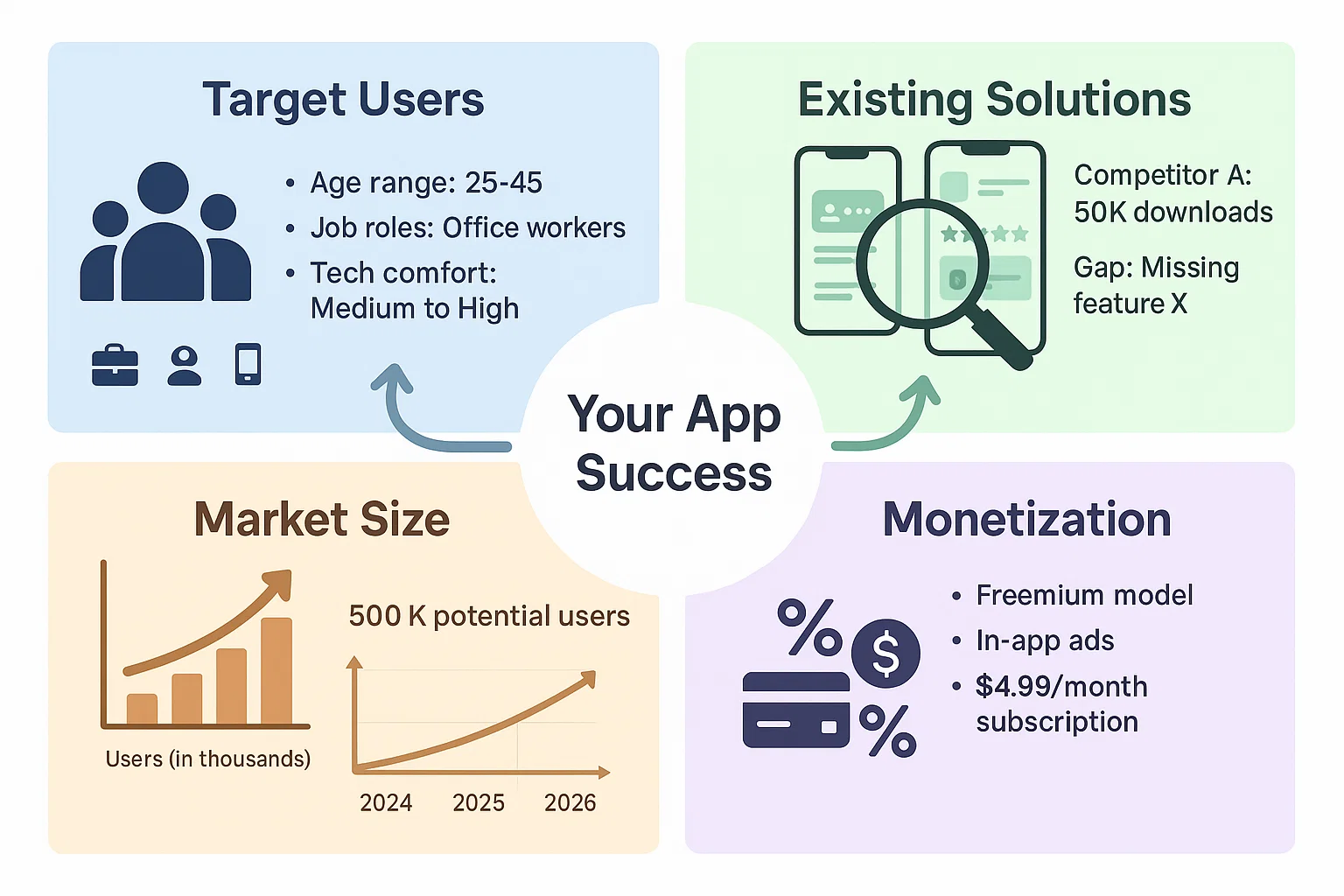
Research these four areas:
Target users: Who faces this problem daily? What are their ages, jobs, and tech comfort levels?
Existing solutions: What apps already try to solve this? Where do they fail?
Market size: How many people actively search for this solution?
Monetization potential: Will users pay, or does advertising make more sense?
Google Trends shows search volume for related terms. App Annie reveals competitor download numbers and revenue estimates. Reddit and Twitter show real complaints about existing apps.
Planning Your App Features and Flow
Feature bloat kills apps. The first version should do one thing extremely well.
Write down every feature idea. Then cut 70% of them. Save those ideas for version 2.0 after proving the core concept works.
Create a feature priority list:
Must Have Features: Functions the app cannot work without. A food delivery app must have restaurant browsing, cart, and checkout.
Should Have Features: Additions that improve experience but are not critical. Saved favorites and order history fit here.
Nice to Have Features: Elements that add polish. Dark mode and custom themes belong in this category.
Will Not Have: Everything else goes here for now.
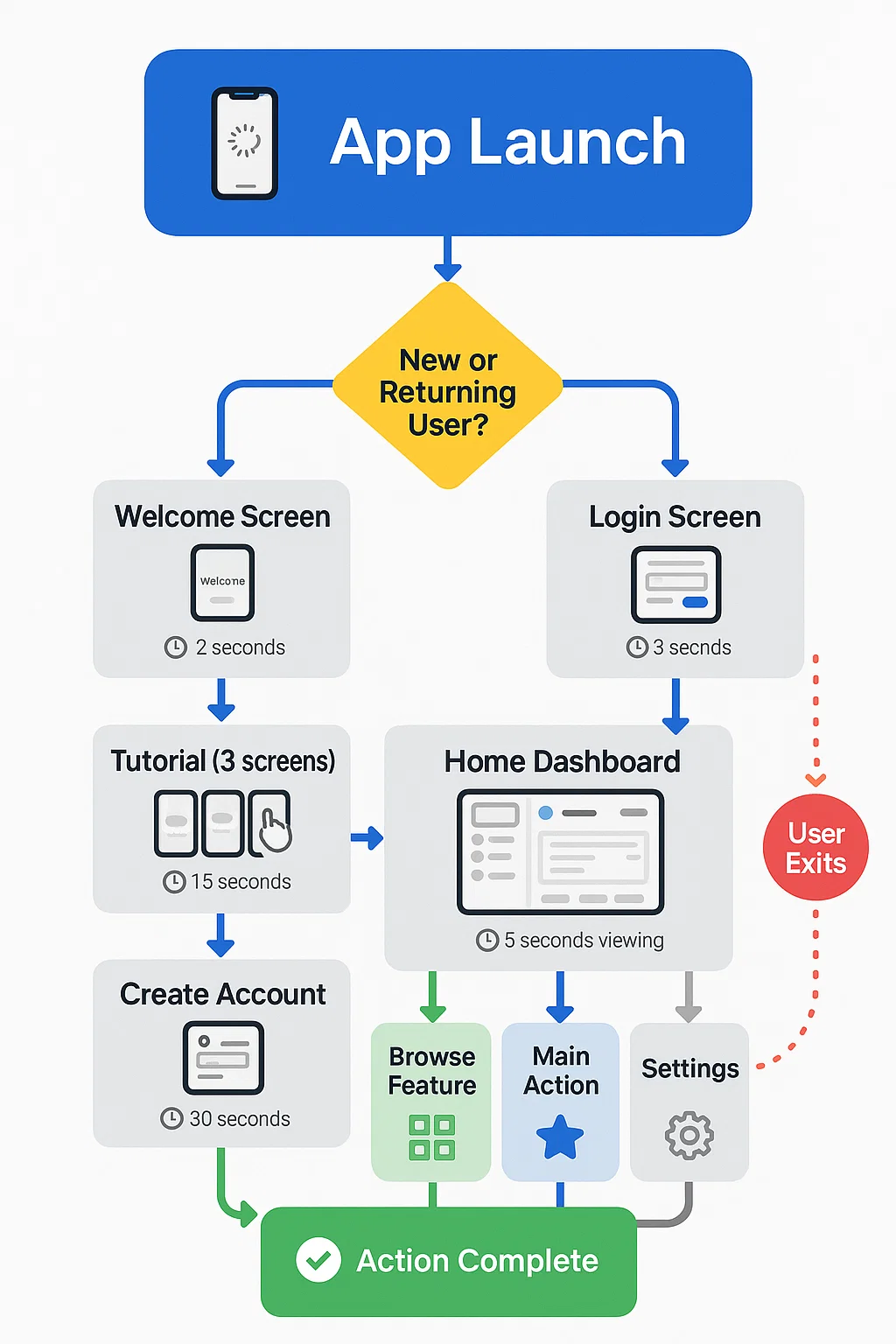
Map the user journey from app open to completing the main action. Every screen should move users toward this goal. Extra steps lose users.
Sketch rough wireframes on paper or use tools like Figma, Sketch, or even PowerPoint. These low cost mockups catch problems before spending money on development.
Choosing Your Development Approach
Three main paths exist for building apps: native development, cross platform development, and no code platforms. Each has specific use cases.
Native Development means building separate apps for iOS (using Swift) and Android (using Kotlin or Java). This costs more and takes longer but delivers the best performance and access to device features.
Choose native when the app needs complex animations, heavy processing, or deep integration with phone hardware. Games, augmented reality apps, and apps using advanced camera features need native development.
Cross Platform Development uses frameworks like React Native or Flutter to write code once and deploy to both iOS and Android. This cuts development time by 30 to 40% compared to native.
Most business apps, social apps, and content apps work perfectly with cross platform development. The performance difference rarely matters for these use cases. [Learn more about Native vs Cross Platform App Development.
No Code Platforms like Bubble, Adalo, or FlutterFlow let non programmers build apps through visual interfaces. These work for simple apps and prototypes but have limitations with custom features and scalability.
No code makes sense for validating ideas quickly or building internal business tools. Avoid them for consumer apps expecting significant growth.
The development approach directly impacts maintenance costs. Native apps require two separate development teams for updates. Cross platform needs one team but may require occasional platform specific fixes. No code platforms charge monthly fees that increase with users.
Building Your Design and User Experience
Design determines whether users understand and enjoy the app. Poor design makes even great ideas fail.
Follow platform guidelines:
Apple publishes Human Interface Guidelines. Google provides Material Design standards. These documents explain how buttons should look, where navigation belongs, and how gestures work. Users expect apps to follow these patterns.
Apps that invent new navigation confuse users. Innovation belongs in features, not basic interface patterns.
Design principles that matter:
Consistency: Buttons in the same location across screens. Colors that mean the same thing throughout. If red means delete on one screen, it should mean delete everywhere.
Clarity: Every button should clearly state its action. "Submit" is vague. "Create Account" or "Place Order" tells users exactly what happens.
Feedback: Every action needs a response. Buttons should animate when pressed. Forms should show success or error messages. Loading states prevent user confusion.
Accessibility: Text should be readable without squinting. Touch targets need enough space for fingers. Color should not be the only way to convey information because some users have color blindness.
Hire a designer or use quality templates. Dribbble and Behance show current design trends. Copy layouts that work but customize colors and content for your brand.
Typography affects readability more than most creators realize. Stick with system fonts (San Francisco for iOS, Roboto for Android) or widely tested alternatives. Never use more than two font families in an app.
Color psychology influences user behavior. Blue builds trust (why banks use it). Red creates urgency (why sale buttons use it). Green suggests success or environmental themes. Choose a primary color that matches your app's purpose and select complementary colors using tools like Adobe Color.
Finding and Working with Developers
Most app creators cannot code. That means hiring developers or an agency.
Freelance Developers cost less but require more management. Upwork, Toptal, and GitHub Jobs connect creators with developers. Expect to pay $25 to $150 per hour depending on location and experience.
Check portfolios carefully. Ask for similar apps they built. Test those apps to see quality. Request references and actually call them.
Freelancers work well for simple apps or when budget is extremely tight. The risk is inconsistent quality and potential project abandonment.
Development Agencies like Deliverables handle the entire process from design to launch. Costs run higher ($15,000 to $150,000+ depending on complexity) but include project management, design, development, and testing.
Agencies reduce risk because teams have diverse skills. If one developer leaves, the project continues. Quality standards tend to be higher because reputations depend on consistent delivery.
Questions to ask potential developers or agencies:
What apps have you built in this category?
Can you provide references from recent clients?
What is your development process and timeline?
How do you handle bugs found after launch?
What happens if the project goes over budget or timeline?
Who owns the code after project completion?
Development Contracts Must Include:
Detailed feature specifications
Clear timeline with milestones
Payment schedule tied to deliverables
Intellectual property ownership terms
Post launch support duration and terms
Process for handling changes and additional features
Never pay 100% upfront. Standard arrangements pay 25% to 30% to start, 40% to 50% at midpoint milestones, and remaining 20% to 25% after final delivery.
The Development Process Explained
Development happens in phases, not all at once.
Phase 1: Backend Development
The backend includes servers, databases, and APIs that power app functions. This invisible infrastructure handles user accounts, data storage, and business logic.
Developers set up servers (often using AWS, Google Cloud, or Microsoft Azure), create databases (like PostgreSQL or MongoDB), and build APIs that let the app communicate with servers.
This phase typically takes 3 to 6 weeks depending on complexity.
Phase 2: Frontend Development
Frontend means the app interface users actually see and touch. Developers turn designs into working screens using the chosen framework.
This includes building every screen, connecting buttons to actions, and integrating with the backend APIs. Animation, transitions, and micro interactions happen here.
Frontend development usually takes 6 to 10 weeks for a full featured app.
Phase 3: Integration and Features
Third party services often get integrated during this phase. Payment processing (Stripe, PayPal), maps (Google Maps, Mapbox), analytics (Google Analytics, Mixpanel), and push notifications (Firebase, OneSignal) connect to the app.
Each integration requires testing to ensure proper function and error handling.
Phase 4: Testing and Quality Assurance
Testing should happen throughout development, not just at the end. Catching bugs early costs less to fix.
Different testing types serve different purposes:
Functional Testing: Does each feature work as designed?
Usability Testing: Can real users complete tasks without confusion?
Performance Testing: Does the app run smoothly on older devices and slow networks?
Security Testing: Are user data and communications protected?
Compatibility Testing: Does the app work across different device models and OS versions?
Beta testing with real users reveals issues developers miss. TestFlight (iOS) and Google Play Beta (Android) let limited users test before public launch.
Plan for at least 2 to 3 weeks of dedicated testing and bug fixing.
Preparing for App Store Launch
Getting approved by Apple App Store and Google Play Store requires following specific rules.
Apple App Store Requirements:
Apps must provide value and not be simply repackaged websites
Accurate descriptions and screenshots
Functional app with no crashes or major bugs
Privacy policy if collecting user data
Compliance with Human Interface Guidelines
No prohibited content (certain gambling, adult content, etc.)
Apple review takes 24 to 48 hours on average but can take up to a week. Rejections are common on first submission. Common rejection reasons include crashes, misleading descriptions, or missing privacy policies.
Google Play Store Requirements:
Unique package name
Proper app categorization
Content rating questionnaire completion
Privacy policy for apps accessing sensitive data
High quality icon and feature graphic
At least 2 screenshots
Google review typically completes within hours but can take up to 7 days. Google is generally more lenient than Apple but still enforces quality standards.
App Store Optimization Before Launch:
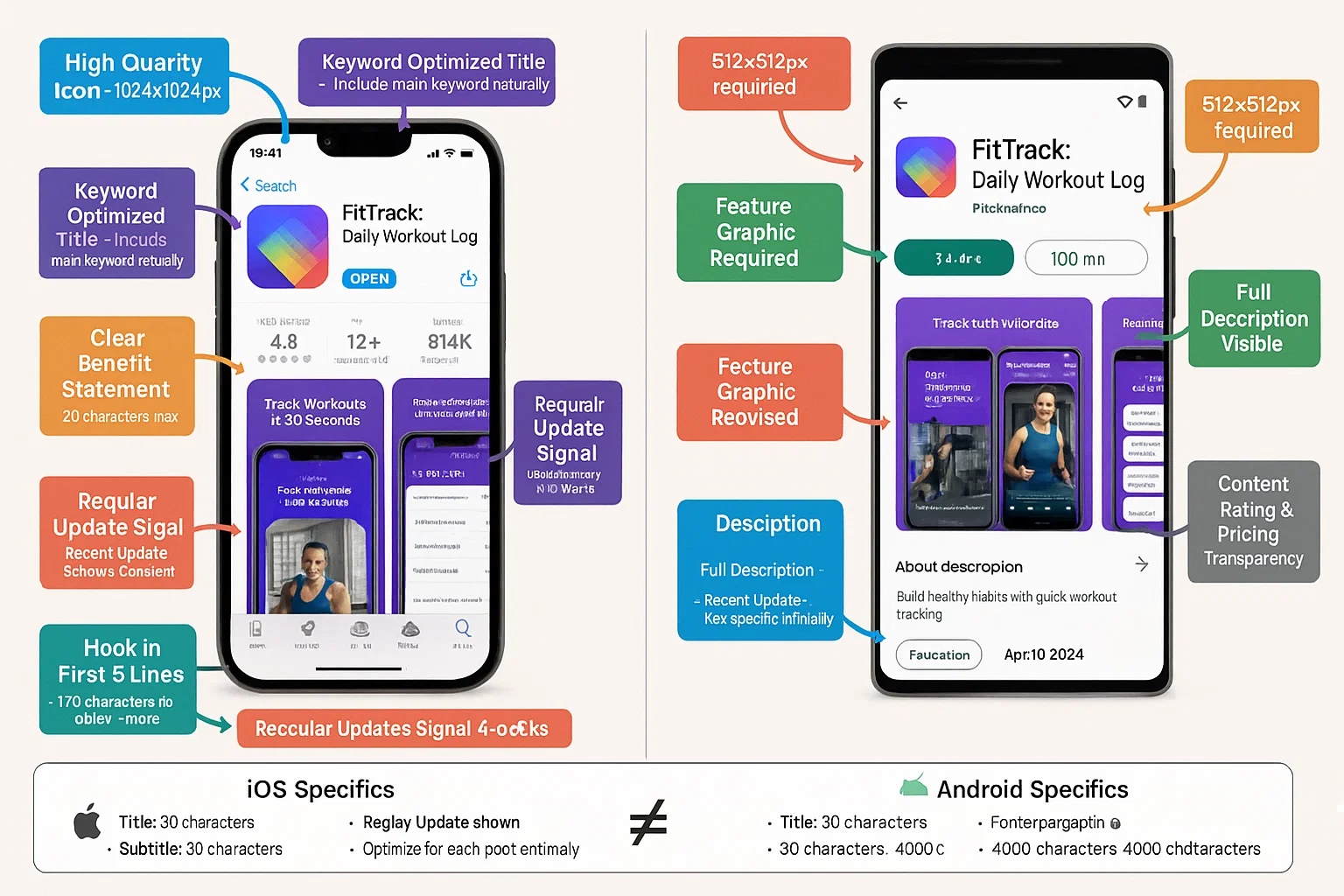
App Store Optimization (ASO) determines how easily users find your app. Think of it as SEO for app stores. Check out our App Store Optimization Complete Guide.
Title: Include your main keyword but keep it clear and memorable. "Recipe Keeper" works better than "Recipe Keeper - Cook Food Meals Ingredients."
Subtitle (iOS) / Short Description (Android): Explain the main benefit in one sentence.
Description: First 2 to 3 sentences are critical because that is what shows before users click "more." Focus on benefits, not features. "Track your water intake and build healthy habits" beats "App includes water tracking feature."
Keywords: Apple lets you enter hidden keywords. Research what terms potential users search. Tools like App Annie and Sensor Tower show keyword search volumes.
Screenshots: First 2 to 3 screenshots determine whether users download. Show the main benefit, not just pretty screens. Add text overlays explaining what users see.
Video Preview: Short videos (15 to 30 seconds) significantly increase conversion rates. Show actual app usage, not marketing fluff.
Ratings and Reviews: Early ratings heavily influence visibility. Ask satisfied beta testers to leave reviews at launch.
Launch Strategy That Gets Users
Having an app in the store means nothing if nobody downloads it.
Pre Launch Activities
Build anticipation before launch day. Create a landing page with email signup 4 to 6 weeks before launch. Product Hunt, BetaList, and similar sites let you list upcoming apps.
Social media teasers work if you show actual value, not vague promises. Short videos demonstrating the main feature perform better than screenshots.
Reach out to relevant bloggers, YouTubers, and journalists 2 to 3 weeks before launch. Small niche publications often cover new apps if the story is relevant to their audience.
Launch Day Push:
Submit to Product Hunt early in the day (12:01 AM Pacific Time) to maximize visibility window. Engage with comments throughout the day.
Post on relevant subreddits (following each community's rules about self promotion). Niche communities often welcome useful tools if presented as helpful, not spam.
Email your pre launch list with the download link and a clear benefit statement.
Post Launch Growth:
The first 1000 users are the hardest to get. Each user acquisition channel needs testing:
Paid Advertising: Apple Search Ads and Google App Campaigns target people actively searching for solutions. Start with small budgets ($10 to $20 per day) to test messaging and targeting.
Content Marketing: Blog posts, videos, and guides that solve related problems can drive organic traffic. This takes time but costs less than ads.
Social Media: Regular posts about tips, user success stories, and behind the scenes updates build community. Focus on 1 to 2 platforms where target users actually spend time.
Partnerships: Other apps or services with complementary audiences might cross promote.
Referral Programs: Giving existing users incentives for inviting friends works well for social and productivity apps.
Track which channels deliver users who actually use the app, not just download it. Retention matters more than download numbers.
Understanding how to monetize the app influences growth strategy. Explore our guide on How to Monetize Your Mobile App.
Post Launch Monitoring and Updates
Launching the app is the beginning, not the end.
Analytics Setup
Install analytics before launch. Firebase (free) provides essential data: daily active users, session length, screen flows, and crash reports.
Mixpanel or Amplitude offer deeper analysis like cohort retention and funnel tracking. These cost money but reveal why users leave or become active.
Metrics That Matter
Retention Rate: What percentage of users return after 1 day, 7 days, 30 days? This indicates if the app provides real value. Good retention varies by category but generally:
Day 1: 35% to 40%
Day 7: 15% to 20%
Day 30: 8% to 12%
Session Length: How long users spend in the app per session indicates engagement level.
Core Action Completion: What percentage of users complete the app's main purpose? For a recipe app, do they view recipes? For a fitness app, do they log workouts?
Crash Rate: Apps should maintain below 1% crash rate. Higher rates lead to bad reviews and uninstalls.
Update Strategy
Plan regular updates every 4 to 6 weeks. Updates signal active development and often trigger App Store featuring.
Updates should include:
Bug fixes based on user reports
Performance improvements
1 to 2 new features users requested
Seasonal content or promotions if relevant
User Feedback Collection
In app feedback forms capture issues and suggestions. Keep them short (2 to 3 questions maximum).
Monitor app store reviews and respond to every review (positive and negative). Responses show potential users that you care.
Social media listening catches conversations about your app beyond official channels.
Create a public roadmap showing planned features. This reduces duplicate suggestions and builds excitement.
Security and Maintenance
Apps require ongoing security updates as vulnerabilities emerge. Operating system updates (new iOS or Android versions) sometimes break app functions.
Budget for maintenance costs, typically 15% to 20% of initial development cost annually. This covers server costs, third party service fees, security updates, and OS compatibility fixes.
Learn about Mobile App Security Best Practices to protect user data and maintain trust.
Common App Development Mistakes to Avoid
Learning from others' mistakes saves time and money.
Building for Everyone: Apps trying to serve everyone end up serving no one well. Narrow focus wins. An app for "organizing tasks" competes with hundreds of options. An app for "organizing construction project tasks" finds a specific audience.
Ignoring Platform Differences: iOS and Android users have different expectations. Back buttons work differently. Navigation patterns differ. Apps that ignore these feel foreign on one platform.
Skipping Beta Testing: Developers see apps differently than users. Beta testing with real target users catches usability issues before public embarrassment.
Overcomplicating Version 1: Every additional feature delays launch and increases cost. Ship the minimum viable product, then improve based on actual usage data.
No Marketing Plan: Great apps fail without users. Marketing deserves as much planning as development. Budget 20% to 30% of total project cost for user acquisition.
Neglecting Onboarding: Users decide within 90 seconds whether to keep or delete apps. Clear onboarding that demonstrates value quickly improves retention dramatically.
Ignoring Performance: Apps that load slowly or drain batteries get uninstalled. Performance testing on older devices prevents bad reviews.
Forgetting Legal Requirements: Apps need terms of service, privacy policies, and compliance with regulations like GDPR or CCPA depending on target markets. Legal issues can force app removal.
Cost Breakdown and Timeline Expectations
App development costs vary widely based on complexity.
Simple Apps (basic functionality, minimal backend):
Cost: $10,000 to $30,000
Timeline: 2 to 3 months
Examples: Calorie tracker, tip calculator, simple game
Moderate Complexity Apps (user accounts, social features, API integration):
Cost: $30,000 to $80,000
Timeline: 3 to 6 months
Examples: Social networking app, marketplace, booking system
Complex Apps (real time features, custom backend, advanced functionality):
Cost: $80,000 to $250,000+
Timeline: 6 to 12+ months
Examples: Streaming service, fintech app, on demand delivery platform
These costs include design, development, and basic testing but not ongoing marketing or maintenance.
Location dramatically affects costs. Developers in North America or Western Europe charge $75 to $150+ per hour. Eastern European developers charge $30 to $75 per hour. Asian developers often charge $15 to $40 per hour.
For a detailed breakdown of what influences these costs and how to budget for your specific app idea, check out our complete guide on how much does app development cost in 2026. Understanding cost factors helps you make informed decisions about features, platforms, and development partners.
Lower rates do not always mean lower costs if communication difficulties cause delays or quality issues require rework.
Timeline Factors:
Feature complexity and number
Platform choice (native takes longer than cross platform)
Third party integrations
Design complexity
Team experience with similar projects
Availability of required APIs
Testing thoroughness
Add 20% to 30% buffer to any timeline estimate. Unexpected issues always emerge.
Final Thoughts on Building Your App
Creating a successful app in 2026 requires equal parts planning, execution, and persistence. The technology and tools exist to bring any idea to life. The difference between apps that succeed and fail comes down to solving a real problem for a specific audience.
Start with thorough research. Build the simplest possible version first. Test with real users early and often. Launch before everything is perfect. Listen to feedback and improve continuously.
The apps that win focus on users, not features. They solve one problem extremely well rather than many problems poorly. They prioritize performance and usability over flashy designs. They adapt based on data rather than assumptions.
App development is a journey, not a destination. Version 1 is just the beginning. The apps people love today have gone through dozens or hundreds of updates based on user feedback and changing technology.
Whether building yourself, hiring freelancers, or working with an agency like Deliverable, success requires clear vision, realistic expectations, and commitment to ongoing improvement. The market rewards apps that make users' lives genuinely better.
The best time to start was yesterday. The second best time is now.
Have an Idea for an App or Website?
At Deliverables, we specialize in building custom digital products that solve real-world problems. Tell us your idea, and our expert team will help you craft a plan to build your dream.
Some Topic Insights:
How long does it take to make an app from scratch?
A simple app takes 2 to 3 months from planning to launch. Apps with moderate features need 3 to 6 months. Complex apps with custom functionality require 6 to 12 months or longer. The timeline depends on feature count, platform choice, team size, and whether unforeseen technical challenges emerge.
Can I build an app without knowing how to code?
What is the average cost to develop a mobile app?
Do I need a company to build an app or can I hire freelancers?
What are the most important features for a successful app?